
Struggling with video? Kling 2.6 Pro on Artlist makes cinematic AI video creation fast & easy for beginners. Generate clips with native audio in minutes.#AIVideo #KlingPro #ArtlistAI
Quick Video Breakdown: This Blog Article
This video clearly explains this blog article.
Even if you don’t have time to read the text, you can quickly grasp the key points through this video. Please check it out!
If you find this video helpful, please follow the YouTube channel “AIMindUpdate,” which delivers daily AI news.
https://www.youtube.com/@AIMindUpdate
Read this article in your native language (10+ supported) 👉
[Read in your language]
Unlocking Cinematic Magic: How Kling 2.6 Pro on Artlist is Revolutionizing AI Video Creation for Beginners
🎯 Level: Beginner
👍 Recommended For: Aspiring Video Creators, Content Marketers, Hobbyists
Imagine you’re a budding YouTuber, staring at your blank screen, dreaming of creating epic videos but bogged down by clunky editing software and zero budget for fancy effects. You’ve got ideas exploding in your head—like a thrilling adventure story or a quick tutorial on your favorite hobby—but turning them into reality feels like climbing a mountain without gear. Enter Kling 2.6 Pro on Artlist, the AI-powered game-changer that’s making professional-grade video creation as easy as snapping a selfie. If you’re new to this, tools like Genspark can help you research and brainstorm prompts in seconds, turning your vague concepts into polished ideas.
John: Alright, folks, let’s cut through the hype. AI video tools have been buzzing like a swarm of caffeinated bees lately, but Kling 2.6 Pro? It’s not just another update—it’s like giving your smartphone a Hollywood studio upgrade. I’ve been knee-deep in AI engineering for years, and this one’s got some raw power under the hood. But hey, Lila, break it down for the newcomers before I geek out on the architecture.
Lila: Absolutely, John. Think of Kling 2.6 Pro as your personal movie director in a box. You type in a simple description—like “a dragon soaring over a misty mountain with epic music”—and poof! It generates a full video clip with visuals, motion, and even built-in audio. No more silent films or hours syncing sound effects. It’s beginner-friendly, available right on Artlist, which is a treasure trove for creators needing stock assets.
Now, let’s talk benefits. This update brings blazing speed—generating videos in minutes instead of hours. Cost savings are huge; forget expensive software subscriptions or hiring editors. And the ROI? If you’re a content creator, you could pump out viral shorts that boost your views and engagement overnight.
The “Before” State: Life Without AI Video Magic
Lila: Remember the old days? You’d film shaky footage on your phone, import it into some bloated editing app, hunt for royalty-free music, and spend weekends tweaking timelines. It was frustrating, time-consuming, and often resulted in something that looked… well, amateur. Tools like Gamma helped with quick docs and slides, but video? That was a whole other beast.
John: Spot on, Lila. From an engineering standpoint, traditional video production relied on manual workflows—think Adobe Premiere or Final Cut Pro, where you’re juggling layers, effects, and audio tracks. It required skills in cinematography, sound design, and more. Kling 2.6 Pro flips the script by automating it all with AI, using models trained on massive datasets to handle everything seamlessly. No more “before” struggles; now it’s plug-and-play creativity.
Core Mechanism: How Kling 2.6 Pro Works Its Magic
Lila: Let’s explain this like a recipe. Imagine you’re baking a cake: the ingredients are your prompts (text or images), the oven is the AI model, and the final cake is your ready-to-share video. Kling 2.6 Pro acts as a super-smart chef that not only bakes but adds frosting (audio) automatically. It’s like having a translator in your pocket that turns your words into a full sensory experience.
John: Diving deeper, the core is built on advanced generative AI, likely fine-tuned from models like those in Hugging Face’s ecosystem—think something akin to Stable Diffusion but for video, enhanced with audio synthesis. It processes text-to-video or image-to-video prompts, generating 1080p clips with native sound effects, speech, and music. The “Pro” version on Artlist adds better motion fidelity and control, using techniques like improved prompt comprehension to reduce artifacts. For the techies, it’s probably leveraging quantization (shrinking the model for faster inference) and something like vLLM for efficient serving. Recent updates, as per industry buzz, make it a step up from silent video generators.
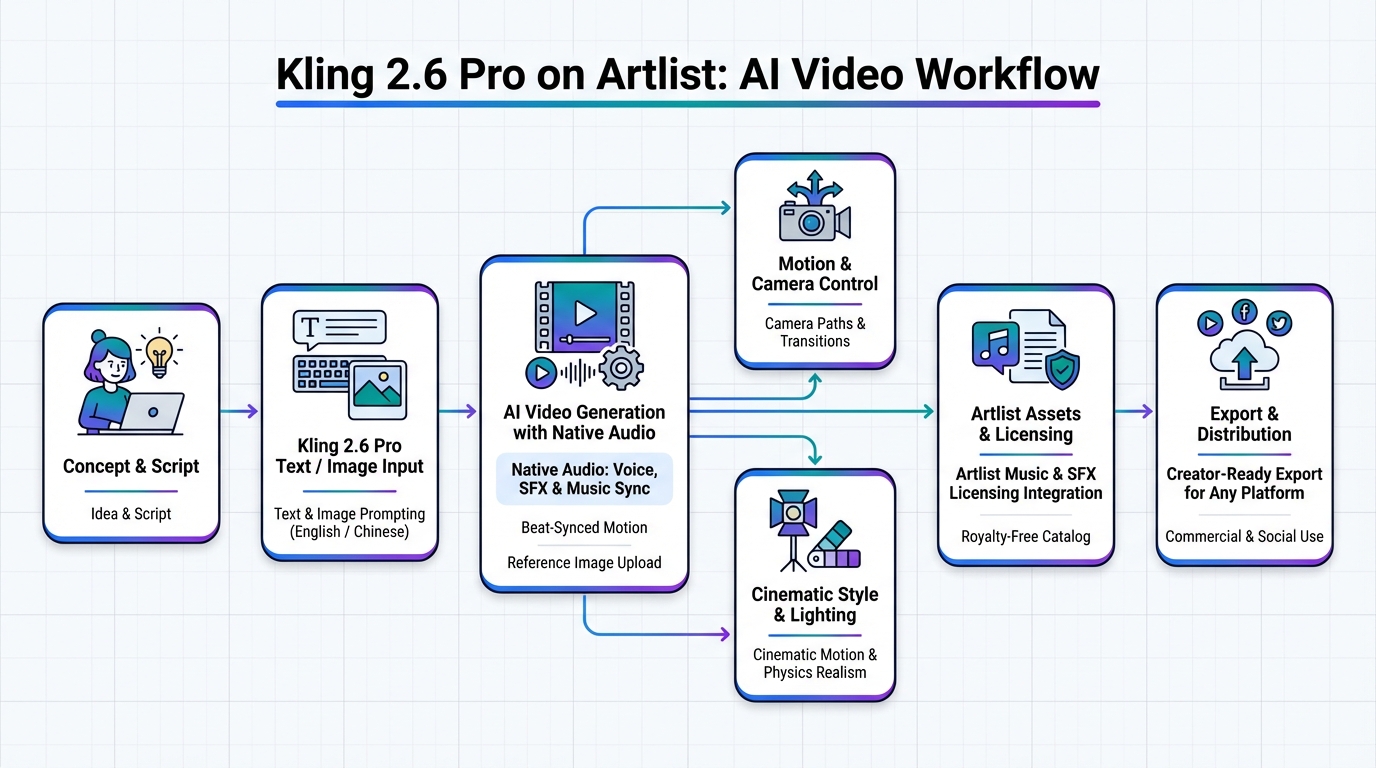
Aha! Moment: Native audio means your videos come alive without extra steps—perfect for quick social media posts.
Use Cases: Bringing Kling 2.6 Pro to Life
Lila: Let’s get practical. First, for social media influencers: Whip up a 30-second promo video from a product image, complete with voiceover and background tunes. Tools like Revid.ai complement this for marketing tweaks.
John: Second, educators or trainers: Create explainer videos on complex topics, like blockchain basics, with AI-generated narration. Pair it with Nolang for coding tutorials that feel interactive.
Lila: Third, small business owners: Generate infinite video backgrounds for ads, like a looping cafe scene with ambient sounds. It’s a game-changer for e-commerce without hiring a crew.
| Aspect | Old Method (Traditional Editing) | New Solution (Kling 2.6 Pro) |
|---|---|---|
| Time to Create | Hours or days | Minutes |
| Audio Integration | Manual syncing required | Native and automatic |
| Skill Level Needed | Advanced editing skills | Beginner-friendly prompts |
| Cost | High (software, stock assets) | Affordable subscription on Artlist |
| Output Quality | Variable, user-dependent | Cinematic with AI polish |
Conclusion: Time to Level Up Your Video Game
John: Wrapping this up, Kling 2.6 Pro on Artlist is democratizing video creation, blending AI smarts with user-friendly access. Whether you’re roasting hype or building real projects, it’s a tool that delivers.
Lila: Exactly! Start experimenting today—head to Artlist, try a prompt, and see your ideas come to life. For automating your workflow further, check out Make.com to connect it all seamlessly.

👨💻 Author: SnowJon (Web3 & AI Practitioner / Investor)
A researcher who leverages knowledge gained from the University of Tokyo Blockchain Innovation Program to share practical insights on Web3 and AI technologies. While working as a salaried professional, he operates 8 blog media outlets, 9 YouTube channels, and over 10 social media accounts, while actively investing in cryptocurrency and AI projects.
His motto is to translate complex technologies into forms that anyone can use, fusing academic knowledge with practical experience.
*This article utilizes AI for drafting and structuring, but all technical verification and final editing are performed by the human author.
🛑 Disclaimer
This article contains affiliate links. Tools mentioned are based on current information. Use at your own discretion.
▼ Recommended AI Tools
References & Further Reading
- Kling 2.6 Pro on Artlist: AI Video in English & Chinese – Artlist Blog
- New Kling O1 on Artlist: The smartest AI video model is here – Artlist Blog
- How Kie.ai’s Kling 2.6 API Is Making Short-Form Video More Accessible for Small Teams | Fingerlakes1.com
- How Kling 2.6 Ushered In a New Era of Infinite Video Backgrounds – buzblog.co.uk
- Kling 2.6 explained: What’s New This Time? – CometAPI