
In my view, the security updates in jQuery 4.0.0 finally bring the library into the modern era.#jQuery #WebSecurity
Quick Video Breakdown: This Blog Article
This video clearly explains this blog article.
Even if you don’t have time to read the text, you can quickly grasp the key points through this video. Please check it out!
If you find this video helpful, please follow the YouTube channel “AIMindUpdate,” which delivers daily AI news.
https://www.youtube.com/@AIMindUpdate
Read this article in your native language (10+ supported) 👉
[Read in your language]
jQuery 4.0.0 Drops: Trusted Types and Why Your Old Code Might Need a Security Wake-Up Call
👍 Recommended For: Aspiring web developers dipping their toes into JavaScript, hobbyist coders maintaining personal sites, and frontend enthusiasts curious about modern security upgrades.
Imagine you’re building a simple website for your side hustle—a blog where users can comment on your latest adventures. You grab jQuery because it’s easy, familiar, and gets the job done without wrestling raw JavaScript. But then, a sneaky hacker slips in some malicious code through a form, and boom—your site is serving up trouble. That’s the kind of nightmare jQuery 4.0.0 aims to prevent with features like Trusted Types. Released in early 2026 after nearly a decade since version 3.0, this update isn’t just a facelift; it’s a security shield for the modern web. Let’s unpack what this means for you, without the jargon overload.
Before we dive in, let’s talk about the elephant in the room: jQuery in 2026? Yeah, it’s still kicking, powering millions of sites despite the rise of frameworks like React or Vue. But if you’re dealing with legacy code or just prefer its simplicity, this release brings faster performance, better security, and lower maintenance costs by dropping outdated baggage.
The “Before” State: Life with Older jQuery Versions
Back in the day—say, pre-2026—using jQuery meant dealing with a library bloated by support for ancient browsers like Internet Explorer 10. You’d write code to manipulate the DOM (that’s the structure of your webpage), but without built-in safeguards, it was easy to accidentally inject harmful scripts. Traditional methods relied on manual sanitization, which was like plugging leaks in a boat with your fingers: error-prone and exhausting. Pain points included slow load times on modern devices, vulnerability to cross-site scripting (XSS) attacks, and the hassle of updating code for every new browser quirk. If your site got hacked, it could mean downtime, lost trust, and even legal headaches for handling user data.
Core Mechanism: Trusted Types Explained Like a Security Checkpoint
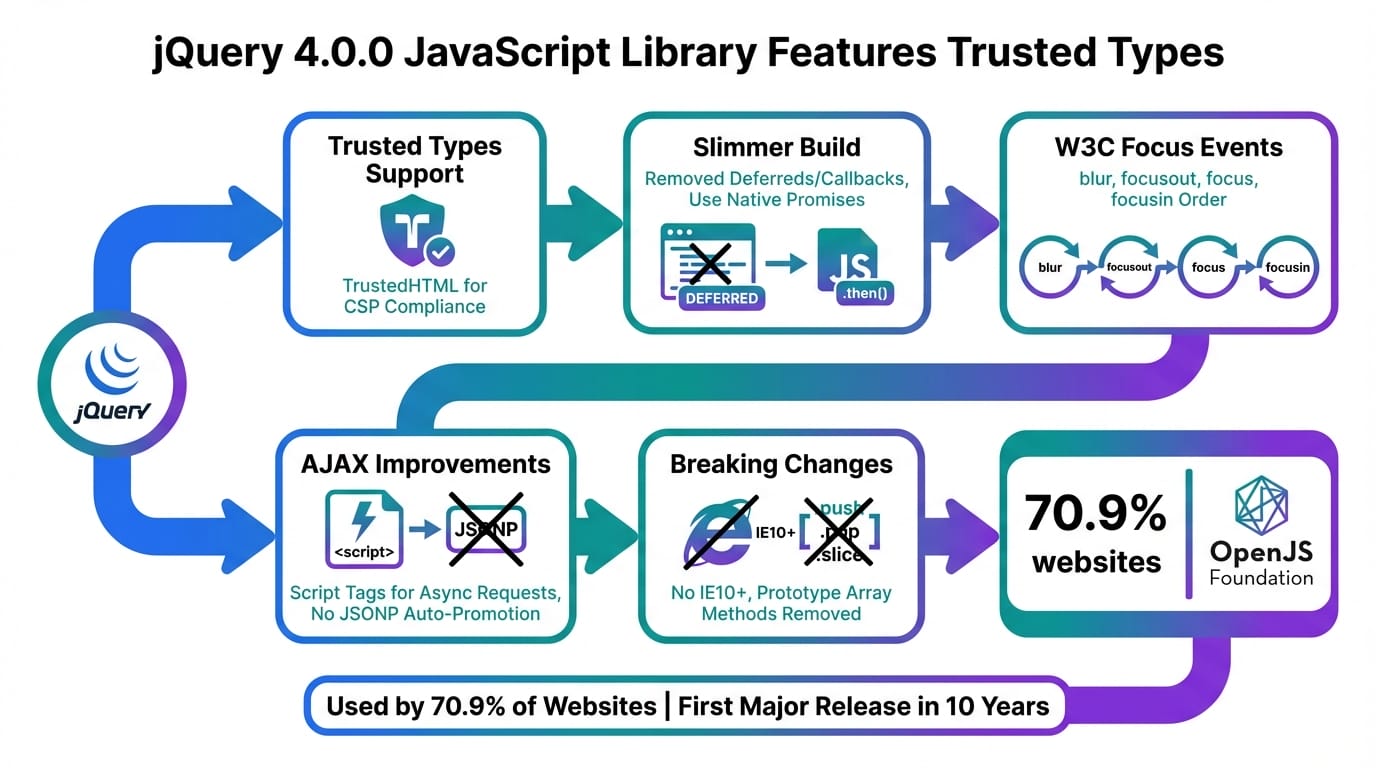
Think of Trusted Types as a bouncer at a club door, checking IDs before letting anyone in. In web terms, it’s a browser API that jQuery 4.0.0 now supports to prevent DOM-based XSS attacks. Normally, when you use jQuery to insert content (like user input) into your page, it could contain sneaky JavaScript that runs unchecked. Trusted Types forces you to “sanitize” that content through a policy—like a factory checkpoint where raw materials get vetted before assembly. jQuery integrates this by ensuring methods like .html() or .attr() only accept “trusted” data, reducing risks without you having to rewrite everything from scratch.
It’s not magic; it’s a deliberate shift to modern web standards. jQuery 4.0.0 trims legacy code, supports only recent browsers (goodbye, IE), and adds these security hooks. The metaphor? It’s like upgrading from an old bike with rusty brakes to one with automatic sensors—safer rides with less effort.
Use Cases: Where jQuery 4.0.0 Shines in Real Life
First, picture a freelance developer building an e-commerce site for a small business. Users submit reviews, and without Trusted Types, a bad actor could inject code to steal session cookies. With jQuery 4.0.0, you enable a Trusted Types policy, and jQuery handles the safe insertion—keeping the site secure and the business humming.
Second, imagine a blogger using WordPress plugins reliant on jQuery. Upgrading to 4.0.0 means faster page loads (thanks to removed legacy features) and built-in protection against comment spam turning into XSS exploits. Your readers stay safe, and you avoid panicked late-night fixes.
Third, for a student project like a interactive portfolio site, jQuery 4.0.0 lets you experiment with dynamic content (e.g., loading images via AJAX) while learning secure practices from the start. It’s beginner-friendly but teaches real-world security, setting you up for pro-level coding.
| Aspect | Old Method (Pre-jQuery 4.0) | New Solution (jQuery 4.0.0 with Trusted Types) |
|---|---|---|
| Security | Manual sanitization needed; high XSS risk | Built-in Trusted Types enforcement; automated safe DOM updates |
| Browser Support | Includes legacy like IE10; bloated code | Modern browsers only; leaner, faster library |
| Performance | Slower due to compatibility shims | Optimized for current standards; quicker execution |
| Ease of Upgrade | Breaking changes rare but compatibility headaches | Manageable updates with clear migration guides |
Conclusion: Time to Update and Level Up Your Web Game
jQuery 4.0.0 isn’t reinventing the wheel—it’s polishing it for today’s roads. With Trusted Types leading the charge, you’re getting a library that’s safer, sleeker, and ready for the future without abandoning its roots. If you’re still on older versions, start by checking your site’s dependencies and testing the upgrade in a safe environment. Embrace this as a chance to audit your code for security gaps and modernize your skills. Who knows? It might just save your site from the next big vulnerability. Dive in, experiment, and keep building— the web’s waiting!
References & Further Reading
- jQuery 4.0 Released: Less Legacy, More Modern Web Standards | heise online
- jQuery 4.0 Released After a Decade With Modernization Changes
- jQuery 4.0 trims browser support, removes APIs | InfoWorld
▼ AI tools to streamline research and content production (free tiers may be available)
Free AI search & fact-checking
👉 Genspark
Recommended use: Quickly verify key claims and track down primary sources before publishing
Ultra-fast slides & pitch decks (free trial may be available)
👉 Gamma
Recommended use: Turn your article outline into a clean slide deck for sharing and repurposing
Auto-convert trending articles into short-form videos (free trial may be available)
👉 Revid.ai
Recommended use: Generate short-video scripts and visuals from your headline/section structure
Faceless explainer video generation (free creation may be available)
👉 Nolang
Recommended use: Create narrated explainer videos from bullet points or simple diagrams
Full task automation (start from a free plan)
👉 Make.com
Recommended use: Automate your workflow from publishing → social posting → logging → next-task creation
※Links may include affiliate tracking, and free tiers/features can change; please check each official site for the latest details.