
Tired of rigid data? Document databases slash operational costs by 20-30% & boost enterprise agility. Learn how.#DocumentDB #NoSQL #EnterpriseData
Quick Video Breakdown: This Blog Article
This video clearly explains this blog article.
Even if you don’t have time to read the text, you can quickly grasp the key points through this video. Please check it out!
If you find this video helpful, please follow the YouTube channel “AIMindUpdate,” which delivers daily AI news.
https://www.youtube.com/@AIMindUpdate
Read this article in your native language (10+ supported) 👉
[Read in your language]
Unlocking Enterprise Efficiency: A Deep Dive into Document Database Options
🎯 Level: Business Leader / Intermediate Tech Professional
👍 Recommended For: CTOs and CIOs, IT Managers, Database Architects
John: In today’s fast-paced enterprise landscape, one of the biggest bottlenecks is handling unstructured data at scale. Traditional relational databases often choke on the sheer volume and variety of documents, leading to sluggish performance, skyrocketing costs, and missed opportunities for real-time insights. But what if you could flip the script with document databases that adapt to your needs? That’s where tools like Genspark, a next-gen research agent, come in—helping you quickly sift through options and benchmarks to make informed decisions. Let’s break this down with some hard-hitting insights.
Lila: Absolutely, John. For those new to this, document databases store data in flexible, JSON-like formats, making them ideal for enterprises dealing with dynamic content. No more rigid schemas forcing you into awkward fits.
The “Before” State: Why Traditional Databases Are Holding You Back
John: Picture this: In the old days—think pre-2010s—enterprises relied heavily on relational databases like SQL Server or Oracle. These beasts were great for structured data, but throw in emails, logs, user profiles, or IoT feeds, and suddenly you’re wrestling with normalization nightmares. Queries take forever, scaling requires expensive hardware, and maintenance? A full-time job. The “before” state was all about rigidity: high latency on complex queries, ballooning storage costs, and teams spending more time on data wrangling than innovation. For instance, a mid-sized firm might spend thousands in ROI-draining downtime just to integrate new data types.
Lila: Exactly. It’s like trying to fit a square peg into a round hole. But now, with document databases, you get flexibility without the chaos. And if you’re documenting these shifts, check out Gamma for creating sleek docs and slides to present your migration strategy to stakeholders.
John: Spot on. The contrast is stark—traditional setups often lead to 20-30% higher operational costs due to inefficient querying, while modern document DBs promise faster deployment and lower TCO.
Core Mechanism: Executive Summary of How Document Databases Work
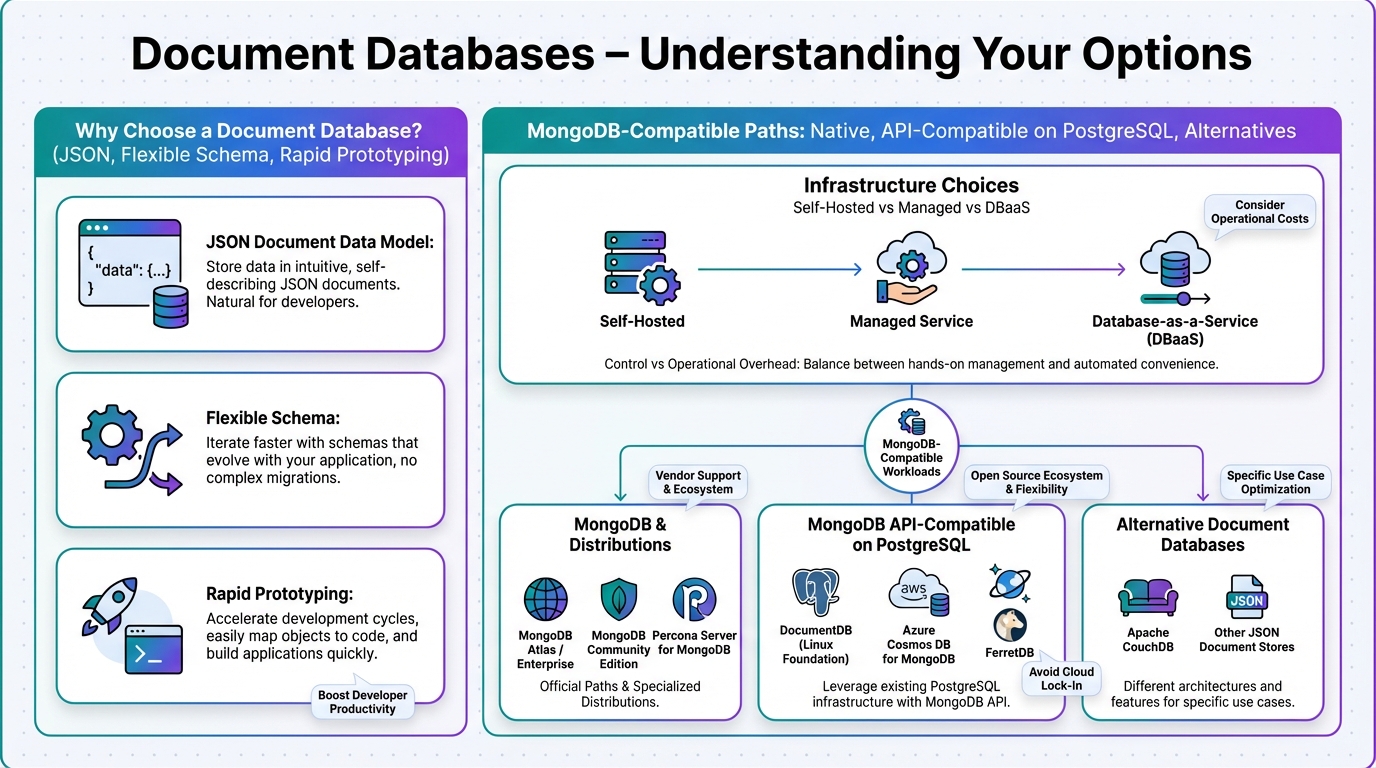
John: At the executive level, document databases operate on a schema-less model, storing data as self-contained documents (think BSON or JSON). This allows for horizontal scaling—add nodes, not headaches. Key mechanisms include indexing for rapid lookups, sharding for distribution, and replication for high availability. From an ROI perspective, they reduce development time by up to 50% since devs aren’t locked into predefined structures. Tools like MongoDB use aggregation pipelines for complex queries, while alternatives like Amazon DocumentDB offer AWS-native integrations for seamless cloud ops.
Lila: To simplify, it’s like having a filing cabinet where each file expands as needed, without reorganizing the whole room. For enterprises, this means quicker time-to-market and better handling of big data workloads.
John: Precisely. Recent benchmarks, like those from Databricks, show these DBs excelling in real-world tasks, far beyond academic tests.
Use Cases: Real-World Scenarios for Enterprise Deployment
John: Let’s get concrete. First scenario: E-commerce giants managing product catalogs. With millions of items, each with varying attributes (reviews, images, specs), a document DB like Couchbase allows nested data storage, enabling sub-second queries and real-time personalization. ROI? Boosted sales through faster load times.
Lila: Second: Healthcare providers handling patient records. Unstructured data like notes and scans fit perfectly, ensuring compliance with HIPAA while scaling for telehealth spikes. It’s a game-changer for workflow optimization.
John: Third: Financial services for fraud detection. Store transaction histories as documents, query patterns instantly—cutting detection time by 40%. For marketing these wins, Revid.ai can turn your case studies into engaging videos. And if you’re coding custom integrations, Nolang is a solid AI tutor for skills like API development with these DBs.
Lila: These aren’t hypotheticals; they’re drawn from industry reports, like those comparing MongoDB to open-source alternatives.
Comparison Table: Old Method vs. New Solution
| Aspect | Old Method (Relational DBs) | New Solution (Document DBs) |
|---|---|---|
| Data Structure | Rigid schemas, tables, and joins | Flexible, schema-less documents |
| Scalability | Vertical scaling, costly hardware | Horizontal scaling, cloud-native |
| Query Speed | Slower for unstructured data | Up to 10x faster for complex queries |
| Cost Efficiency | High maintenance and licensing fees | Lower TCO, pay-as-you-go models |
| Use Case Fit | Best for transactional data | Ideal for content management, analytics |
John: This table cuts through the noise—document DBs like MongoDB or ScyllaDB outperform in enterprise settings, per recent comparisons.
Conclusion: Time to Optimize Your Data Strategy
John: In summary, document databases aren’t just options; they’re necessities for enterprises chasing agility, cost savings, and ROI. From MongoDB’s dominance to emerging players like FerretDB, the choices are robust. Don’t lag—assess your needs, pilot a solution, and watch your workflows transform.
Lila: Start small: Automate your evaluations with Make.com to integrate DB insights into your dashboards. Your enterprise will thank you.

👨💻 Author: SnowJon (Web3 & AI Practitioner / Investor)
A researcher who leverages knowledge gained from the University of Tokyo Blockchain Innovation Program to share practical insights on Web3 and AI technologies. While working as a salaried professional, he operates 8 blog media outlets, 9 YouTube channels, and over 10 social media accounts, while actively investing in cryptocurrency and AI projects.
His motto is to translate complex technologies into forms that anyone can use, fusing academic knowledge with practical experience.
*This article utilizes AI for drafting and structuring, but all technical verification and final editing are performed by the human author.
🛑 Disclaimer
This article contains affiliate links. Tools mentioned are based on current information. Use at your own discretion.
▼ Recommended AI Tools
References & Further Reading
- Document databases – understanding your options | InfoWorld
- Document vs Relational Database: Choosing the right fit for your needs | FerretDB Blog
- NoSQL Database Comparison – ScyllaDB
- Types of Databases (With Examples): A Complete Guide for 2025
- Different Types of Databases & When To Use Them | Rivery