
VS Code AI in 2026: How It Transforms Creative Workflows
VS Code is no longer just a code editor. With agent mode, open-source Copilot, and MCP support, it’s becoming the central hub for AI-powered creative work — and you don’t need to be a developer to benefit.
The Surprising Shift: A Code Editor for Everyone
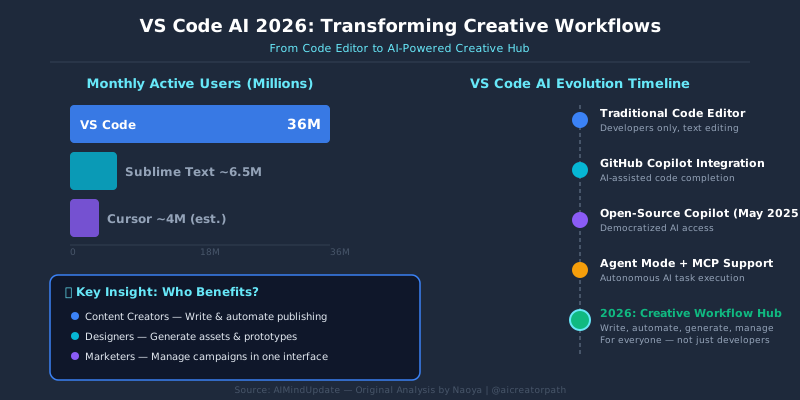
Here’s a number that sets the stage: VS Code has over 36 million monthly active users (compared to Sublime Text’s estimated 5-8 million and Cursor’s rapidly growing but still smaller user base). When Microsoft open-sourced GitHub Copilot Chat in VS Code in May 2025, it signaled something bigger than a product update. It meant that the world’s most popular editor was betting its future entirely on AI — and opening the door for non-developers to walk through.
Why does this matter to you if you’re a content creator, designer, or marketer who uses ChatGPT daily? Because VS Code with AI is quickly becoming the place where you can write, automate, generate, and manage creative projects — all in one interface. Think of it as upgrading from a calculator to a spreadsheet. The tool does the same basic thing, but the possibilities expand dramatically.
VS Code’s AI features are crossing the boundary from “developer tool” to “creative operating system.” If you already use ChatGPT daily, VS Code AI might be your next productivity leap.
Background: Why VS Code AI Matters in 2025-2026
Three converging trends explain why this is happening now, not two years ago.
Trend 1: Agent mode (AI that takes actions, not just suggestions). Traditional Copilot autocompleted your code. Agent mode, introduced in VS Code in early 2025, lets the AI plan multi-step tasks, create files, run terminal commands, and fix its own errors. It’s the difference between an AI that says “you could try this” and one that actually does it for you.
Trend 2: Open-source Copilot Chat. In May 2025, Microsoft open-sourced the core Copilot Chat extension. This means independent developers worldwide can now build custom AI tools on top of VS Code. The ecosystem is expanding fast — similar to how smartphone app stores exploded after Apple opened the SDK.
Trend 3: MCP support (Model Context Protocol — a standard that lets AI connect to external tools and data sources). With MCP, your VS Code AI can pull from databases, APIs, design tools, or file systems. It’s no longer trapped inside the editor. It can reach out and interact with your entire workflow.
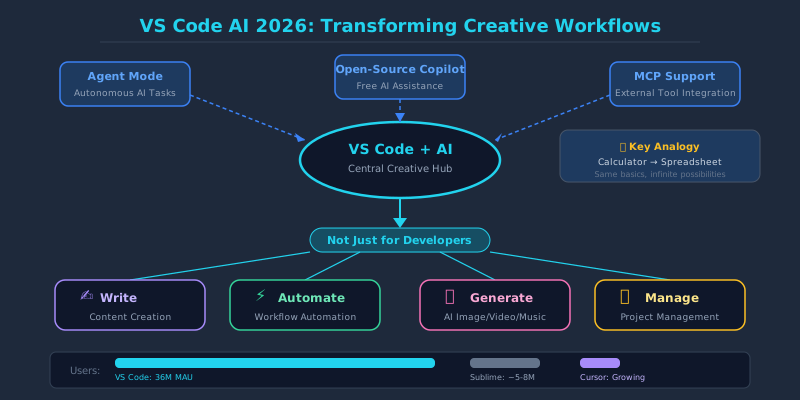
VS Code’s 36M+ monthly users now have access to agent mode, open-source Copilot Chat, and MCP — three features that didn’t exist together a year ago. That’s more people with access to agentic AI (AI that can independently execute tasks) than any other desktop tool.
Analysis: VS Code AI vs. The Competition
VS Code isn’t the only AI-powered editor. Cursor, Windsurf (formerly Codeium), and JetBrains AI have all made strong moves. Here’s how they compare as of mid-2025 — and what it means for creative professionals specifically.
| Feature | VS Code + Copilot | Cursor | Windsurf |
|---|---|---|---|
| Agent Mode | Yes (built-in since early 2025) | Yes (Composer agent) | Yes (Cascade flows) |
| Free Tier | Yes (2,000 completions/month on free plan) | Limited free tier | Free tier available |
| MCP Support | Yes (native) | Yes | Yes |
| Model Flexibility | GPT-4o, Claude, Gemini (multi-model) | GPT-4o, Claude, custom models | Proprietary + some model choice |
| Extension Ecosystem | 40,000+ extensions (largest) | VS Code compatible (fork) | Growing, smaller ecosystem |
| Open-Source Core | Yes (editor + Copilot Chat) | No (proprietary fork) | No |
| Best For Creative Workflows | Broad ecosystem, integrations, free start | Fast iteration, coding-heavy projects | Guided flow-based automation |
The key differentiator for creative professionals is the combination of a free tier, the massive extension ecosystem, and multi-model support. VS Code lets you switch between GPT-4o for writing tasks and Claude for analytical work within the same interface — something you’d normally need multiple browser tabs to do.
If you’re a creative professional (not a full-time developer), VS Code + Copilot likely offers the best starting point: it’s free to begin, has the widest tool ecosystem, and now supports multiple AI models. Cursor and Windsurf are excellent but lean harder toward pure coding workflows.
How Creative Workflows Actually Change
Let me be specific about what “transforming creative workflows” means in practice. These are concrete scenarios, not abstract promises.
Scenario 1: Content Creation Pipeline
Before VS Code AI, a typical blog workflow looked like: research in browser → draft in Google Docs → ChatGPT for editing → manual formatting → copy to CMS. With agent mode, you can describe the entire process in a single prompt. The AI creates the file, writes the draft, formats it in Markdown or HTML, and can even prepare it for upload via MCP connections to your CMS. Five steps collapse into one conversation.
Scenario 2: AI Image Generation Scripting
If you generate images with Stable Diffusion or Midjourney, you’ve likely spent hours managing prompts. In VS Code, you can build and run prompt management scripts — the AI writes the automation code for you. Ask agent mode to “create a Python script that generates 50 variations of this prompt with different styles and saves them to a CSV,” and it will write, test, and debug the script without you touching the code.
Scenario 3: Video and Audio Project Management
Creative projects generate messy file structures. Agent mode can organize, rename, and batch-process files through terminal commands. It can write FFmpeg (a command-line tool for processing video and audio) scripts to convert formats, trim clips, or extract audio — tasks that previously required either manual work or specialized software knowledge.
Scenario 4: Website and Portfolio Updates
This is where non-developers see the most immediate value. You can open your portfolio site in VS Code, tell the AI “add a new project section with these three images and this description,” and watch it edit the HTML, CSS, and deploy. What used to require hiring a developer or spending a weekend learning code now takes minutes.
The real shift isn’t that AI writes code — it’s that creative professionals can now describe outcomes in plain language and get working results. Agent mode bridges the gap between “I know what I want” and “I can make it happen.”
What GitHub Copilot Coding Agent Adds
Announced at Microsoft Build 2025, the GitHub Copilot coding agent goes beyond the editor. It can autonomously pick up GitHub Issues (task tickets in a software project), create a branch, write the code, and submit a pull request (a proposed change for review). For creative teams, this means:
- You can file an issue like “Update the homepage banner for summer campaign” and the agent will attempt the changes automatically
- It works asynchronously — start a task before lunch, review the results after
- It runs in a secure cloud sandbox, so it won’t break your live site
This is still primarily useful for teams with existing GitHub workflows, but it signals where things are heading: AI as an autonomous team member, not just an assistant you have to prompt continuously.
The coding agent turns GitHub from a developer-only platform into a task management system where AI does the implementation. Even if you only file issues and review results, you’re now participating in the development process.
Impact on Your Work and Life
Here’s the honest assessment of who benefits and how much.
High impact: Content creators who manage their own websites, newsletters, or digital products. VS Code AI dramatically reduces the technical barrier. Tasks that required hiring someone — or spending days on YouTube tutorials — can now be completed through conversation with the AI.
Medium impact: Creative professionals who work with data — marketing analysts, social media managers, researchers. Agent mode can write data processing scripts, generate visualizations, and automate reporting. You describe the output; it builds the pipeline.
Lower (but growing) impact: Pure visual creatives — illustrators, photographers, video editors. VS Code AI is less directly useful for work done primarily in Adobe Creative Suite or DaVinci Resolve. However, the peripheral tasks (file management, batch processing, website updates) still benefit substantially.
The broader trend is clear. The distinction between “technical” and “creative” work is dissolving. Tools like VS Code AI don’t replace creative judgment — they remove the implementation friction that used to require specialized technical skills.
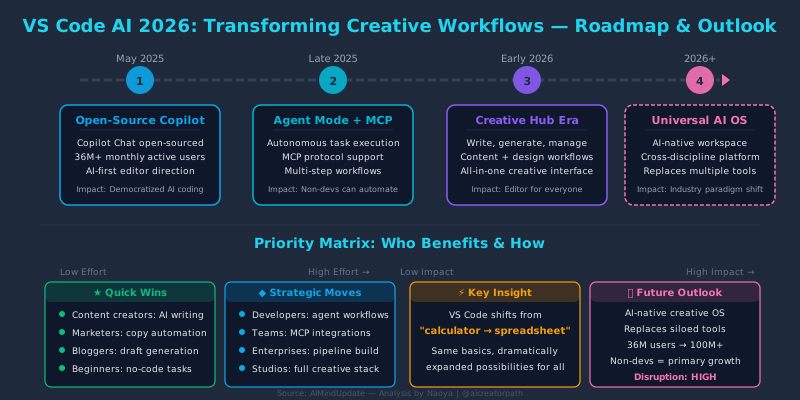
The biggest winners are people who have creative vision but were previously bottlenecked by technical implementation. VS Code AI is essentially a translator between “what you want” and “how to build it.”
Summary
1. VS Code has evolved from a code editor to an AI-powered creative workspace. Agent mode, open-source Copilot Chat, and MCP support create a platform where non-developers can automate complex creative workflows through natural language.
2. The competition is fierce but VS Code holds key advantages. A free tier, 40,000+ extensions, multi-model AI support, and the backing of Microsoft/GitHub make it the most accessible entry point for creative professionals exploring AI-assisted workflows.
3. The technical-creative divide is collapsing. Tasks that previously required hiring developers or learning programming — website updates, data processing, file automation, content pipelines — can now be accomplished through conversation with AI agents inside VS Code.
Author’s Take
I’ve been watching the AI editor space closely, and what strikes me most is that VS Code’s strategy isn’t about having the best AI — it’s about having the best platform. By open-sourcing Copilot Chat and supporting MCP, Microsoft is playing the same game that made VS Code dominant in the first place: create the ecosystem, and let the community build the value. For creative professionals, this means the tool will only get more useful as developers build extensions specifically for non-coding workflows. The risk? Vendor lock-in to the Microsoft/GitHub ecosystem. The reward? Likely the most polished AI creative workspace available within the next 12 months.
You don’t need to commit to anything. Install VS Code (free), activate Copilot’s free tier, and try one creative task — like asking agent mode to format a blog post or organize a folder of project files. That single experiment will tell you more than any article can.
Next Steps: What You Can Do Today
- Install VS Code and activate the free GitHub Copilot tier. Go to code.visualstudio.com, download, and sign in with a GitHub account. The free plan gives you 2,000 code completions and 50 chat messages per month — enough to explore.
- Try agent mode with a real task from your workflow. Open a project folder, switch to agent mode in the Copilot Chat panel, and describe something concrete: “Create an HTML page that displays my portfolio with these project descriptions.” Watch how it plans, creates files, and iterates.
- Explore one MCP integration. If you use Notion, Google Drive, or a CMS, search for MCP servers that connect to those tools. Connecting even one external data source dramatically expands what VS Code AI can do for your creative workflow.
Data Sources
- Visual Studio Code — Official Site
- GitHub Blog — GitHub Copilot: The Agent Awakens (Build 2025 Announcement)
- GitHub Blog — Open-Sourcing Copilot Chat in VS Code
- VS Code Documentation — GitHub Copilot Overview
- Model Context Protocol (MCP) — Official Specification
- GitHub Copilot — Features and Pricing
- Cursor — AI Code Editor
- Windsurf (formerly Codeium) — AI-Powered Editor
Original Analysis: What This Means for the Future of Creative Tools
The VS Code AI story is, at its core, a story about platform power. Microsoft is executing a playbook it perfected with Windows and Office: become the default environment, then layer intelligence on top. The open-sourcing of Copilot Chat isn’t altruism — it’s a moat-building strategy. By letting thousands of developers extend the AI capabilities, Microsoft ensures that the richest ecosystem lives inside VS Code. Competitors like Cursor may have sharper AI features on any given day, but they can’t match the network effects of 40,000+ extensions and 36 million users.
For creative professionals, the implication is profound and slightly uncomfortable. The tools that will define creative work in 2026 aren’t being built by Adobe or Canva — they’re being built inside a code editor. This doesn’t mean you need to learn programming. It means the interface between human intent and machine execution is shifting toward text-based conversation, and VS Code happens to be the best text-based environment ever built.
I think the most underreported angle is MCP. Model Context Protocol is doing for AI tools what USB did for hardware: creating a universal connector. Once your AI editor can talk to your design tools, your CMS, your file storage, and your analytics dashboard through a single standard, the editor becomes the control center for your entire creative operation. We’re likely 12-18 months away from this being seamless, but the foundation is being laid right now.
The practical advice? Don’t wait until it’s polished. The creative professionals who experiment with these tools today — even clumsily — will have a significant advantage over those who wait for a user-friendly tutorial in 2027. The learning curve is real, but it’s shorter than you think.
Disclaimer: The information provided on this site is for educational and informational purposes only. AI technologies evolve rapidly; please verify details with official sources before making decisions.
About the Author: Naoya is a content creator specializing in AI tools and creative workflows. From image generation and video production to music composition with AI, he shares practical techniques for leveraging generative AI in creative projects.
🔗 Follow on X: @aicreatorpath