
From experience, centralizing work in VS Code creates a massive speed advantage for teams.#VSCode #AI
Quick Video Breakdown: This Blog Article
This video clearly explains this blog article.
Even if you don’t have time to read the text, you can quickly grasp the key points through this video. Please check it out!
If you find this video helpful, please follow the YouTube channel “AIMindUpdate,” which delivers daily AI news.
https://www.youtube.com/@AIMindUpdate
Read this article in your native language (10+ supported) 👉
[Read in your language]
Revolutionizing AI Agent Development: How VS Code’s New Extension Supercharges Enterprise Workflows
👍 Recommended For:
- Software development managers seeking workflow efficiencies
- Enterprise architects integrating AI into production pipelines
- Tech executives evaluating ROI on AI tools
In today’s fast-paced digital economy, businesses face a critical bottleneck: the slow and siloed process of developing AI agents. Traditional methods often involve disjointed tools, manual handoffs between coding environments and testing platforms, leading to prolonged development cycles and inflated costs. Enter Visual Studio Code’s latest extension for agent development, a game-changer that bridges these gaps, enabling seamless creation, testing, and iteration of AI agents directly within a familiar IDE. Drawing from recent updates in 2026, this extension integrates with Copilot Studio, allowing developers to leverage any VS Code-compatible AI assistant for building agents, then sync effortlessly for real-world validation. This isn’t just a feature add-on; it’s a strategic enabler for faster time-to-market, reduced operational overhead, and measurable ROI in AI-driven initiatives.
The “Before” State: Navigating the Pain Points of Traditional AI Agent Development
Before this extension, AI agent development resembled a fragmented assembly line. Developers would code in one environment, like a standard IDE, then export to separate platforms for testing—think manual uploads to cloud services or custom scripts for iteration. This led to inefficiencies: version mismatches, debugging nightmares, and teams wasting hours on context-switching. In enterprise settings, these pain points translated to higher costs—up to 30% more in development time, according to industry benchmarks—and delayed deployments that could cost businesses millions in lost opportunities. Contrast this with the new approach, where everything happens in one cohesive ecosystem, minimizing errors and accelerating delivery.
Core Mechanism: Streamlined Logic for Enterprise-Grade Agent Building
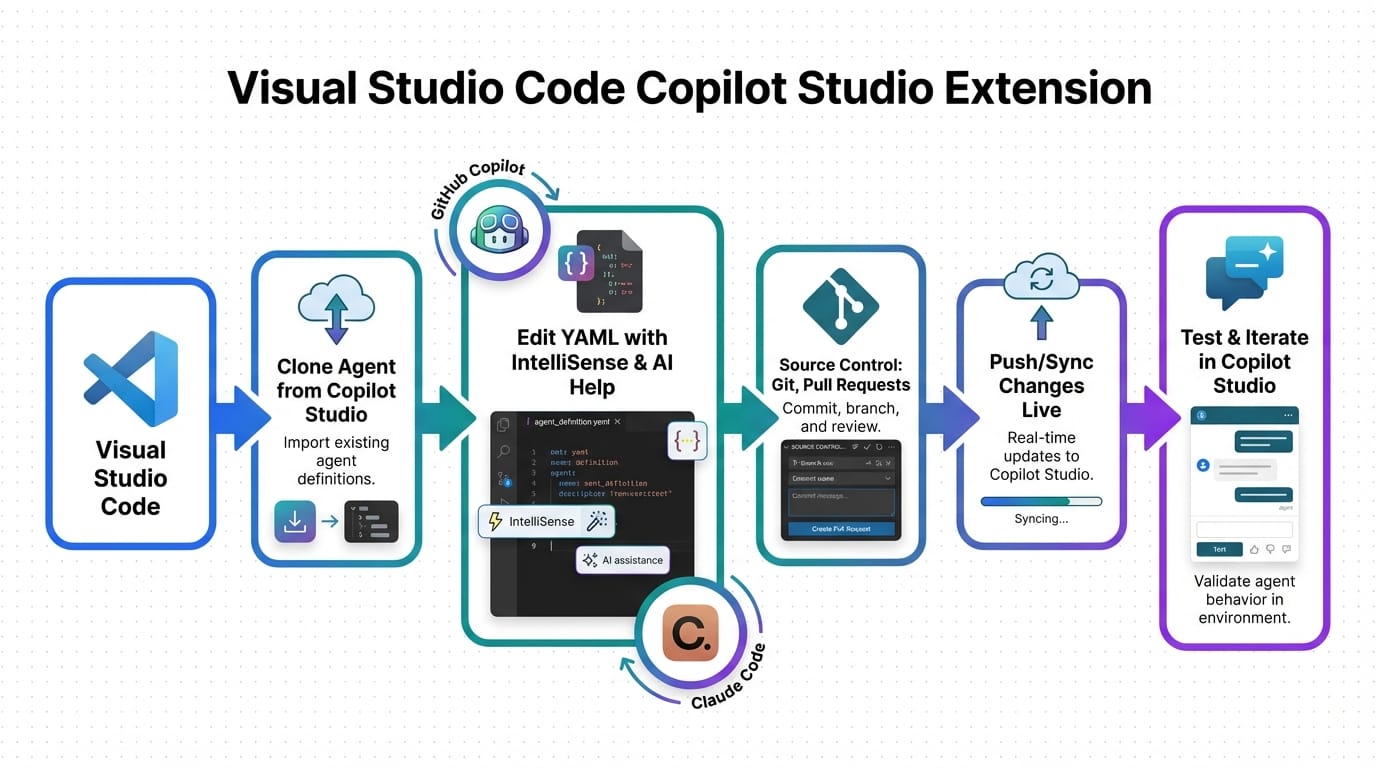
At its core, the VS Code agent development extension operates on a structured, executive-level logic: it unifies the development lifecycle into a single, integrated workflow. Developers define agents using local YAML configurations, leverage GitHub Copilot for code generation, and synchronize directly with Copilot Studio for testing and iteration. This isn’t hype; it’s grounded in practical architecture—think of it as an automated pipeline where AI assistants handle repetitive tasks, while human oversight focuses on high-value decisions. Key enablers include experimental features like Agent Skills (folders of instructions, scripts, and resources for specialized tasks) and multi-agent orchestration, allowing delegation across local, background, and cloud agents. From a business perspective, this reduces dependency on proprietary tools, supports CI/CD integration for automated deployments, and scales with open-source frameworks like Llama-3 models for fine-tuning, ensuring cost-effective customization without vendor lock-in.
John: Look, the real engineering reality here is that this extension cuts through the fluff of isolated tools. It’s not magic—it’s about leveraging existing VS Code compatibility to build agents that can actually run in production, with trade-offs like needing stable internet for Copilot sync but gaining massive speed in iteration cycles.
Lila: Exactly, and for beginners dipping into AI, think of it like upgrading from a clunky bicycle to a high-speed train—same destination, but way less effort.
Use Cases: Real-World Applications Driving Business Value
To illustrate the extension’s impact, consider these three concrete scenarios:
- Automating Customer Support Workflows: An e-commerce enterprise uses the extension to develop an AI agent that handles tier-1 queries. Developers code the agent’s logic in VS Code with Copilot assistance, define skills for natural language processing, and sync to Copilot Studio for live testing. Result: 50% faster deployment and reduced support costs by automating routine interactions.
- Optimizing Supply Chain Analytics: A logistics firm builds agents for predictive inventory management. Starting with YAML definitions in VS Code, they integrate data from APIs, orchestrate multi-agent tasks (e.g., one for forecasting, another for alerts), and iterate via Studio sync. This yields improved ROI through real-time insights, minimizing stockouts without overhauling existing systems.
- Enhancing DevOps Pipelines: A software company creates agents for code review automation. Using the extension’s Git integration, devs fine-tune models like Llama-3-8B for code analysis, test in Studio, and deploy via CI/CD. The outcome? Lower error rates and accelerated release cycles, directly impacting time-to-market in competitive markets.
Comparison: Old Method vs. New Solution
| Aspect | Old Method (Traditional Tools) | New Solution (VS Code Extension) |
|---|---|---|
| Development Environment | Fragmented across multiple IDEs and platforms | Unified in VS Code with seamless integration |
| Testing and Iteration | Manual exports and disjointed workflows | Direct sync with Copilot Studio for rapid cycles |
| Cost Efficiency | High due to inefficiencies and tool silos | Lower with AI-assisted automation and ROI gains |
| Scalability | Limited by manual processes | Enhanced via multi-agent orchestration and CI/CD |
Conclusion: Embracing the Future of AI-Driven Development
In summary, VS Code’s agent development extension addresses key enterprise challenges by streamlining workflows, enhancing collaboration, and delivering tangible business benefits like speed, cost savings, and ROI. To get started, install the extension from the VS Code marketplace, explore integration with GitHub Copilot, and pilot it in a small project. This mindset shift—from siloed tools to integrated ecosystems—positions your team for long-term success in an AI-native world.
[Important Insight] Remember, the true value lies in experimentation; test with real data to uncover hidden efficiencies.
References & Further Reading
- Visual Studio Code adds agent development extension | InfoWorld
- Copilot Studio Extension for Visual Studio Code Is Now Generally Available – Microsoft 365 Developer Blog
- Visual Studio Code adds support for agent skills | InfoWorld
▼ AI tools to streamline research and content production (free tiers may be available)
Free AI search & fact-checking
👉 Genspark
Recommended use: Quickly verify key claims and track down primary sources before publishing
Ultra-fast slides & pitch decks (free trial may be available)
👉 Gamma
Recommended use: Turn your article outline into a clean slide deck for sharing and repurposing
Auto-convert trending articles into short-form videos (free trial may be available)
👉 Revid.ai
Recommended use: Generate short-video scripts and visuals from your headline/section structure
Faceless explainer video generation (free creation may be available)
👉 Nolang
Recommended use: Create narrated explainer videos from bullet points or simple diagrams
Full task automation (start from a free plan)
👉 Make.com
Recommended use: Automate your workflow from publishing → social posting → logging → next-task creation
※Links may include affiliate tracking, and free tiers/features can change; please check each official site for the latest details.