
Personally, the Python JIT seems promising. It optimizes heavy loops naturally.#Python #Programming
Quick Video Breakdown: This Blog Article
This video clearly explains this blog article.
Even if you don’t have time to read the text, you can quickly grasp the key points through this video. Please check it out!
If you find this video helpful, please follow the YouTube channel “AIMindUpdate,” which delivers daily AI news.
https://www.youtube.com/@AIMindUpdate
Read this article in your native language (10+ supported) 👉
[Read in your language]
Unlocking Python’s Speed Secret: Getting Started with the New Native JIT Compiler
👍 Recommended For: Python hobbyists tinkering with personal projects, data enthusiasts running simple scripts, and curious coders exploring performance tweaks without deep expertise.
Imagine you’re whipping up a quick Python script to crunch some numbers for your weekend data analysis hobby. It’s fun, but then it starts chugging along like an old car on a steep hill—slow, inefficient, and making you wait forever for results. You’ve heard whispers about Python getting faster, but where do you even start? That’s where Python’s shiny new native Just-In-Time (JIT) compiler comes in. It’s like giving your code a turbo boost without needing to overhaul the entire engine. In this post, we’ll walk you through it step by step, making sure even if you’re new to this, you’ll feel like a pro by the end.
John: Alright, folks, as the battle-hardened Senior Tech Lead here at AI Mind Update, I’ve seen my share of “game-changing” tech hype. Python’s native JIT? It’s not going to turn your Raspberry Pi into a supercomputer overnight, but it’s a solid engineering step forward. No fluff—just real speed gains for everyday code.
Lila: And I’m Lila, your bridge for beginners. Think of me as the friend who explains why your car needs an oil change without using mechanic jargon. We’ll start simple and build up, so no one gets left in the dust.
The “Before” State: Why Python Felt Like a Snail
Traditionally, Python has been an interpreted language, meaning your code gets translated and executed line by line at runtime. It’s super flexible and easy to write—perfect for rapid prototyping—but that comes at a cost. Loops, calculations, and repetitive tasks can drag because there’s no ahead-of-time optimization. Remember those times when a simple data processing script took minutes instead of seconds? That’s the pain point. Developers often resorted to workarounds like rewriting hot spots in C or using external libraries like Numba for JIT compilation. It worked, but it added complexity, especially for beginners who just wanted their code to run faster without a PhD in compilers.
John: Let’s roast the hype a bit: For years, Python’s been called “slow” in tech circles, and honestly, it earned that rep in performance-critical scenarios. But with the native JIT in Python 3.15, we’re seeing up to 20% speed improvements or more on certain workloads, straight from the core team. No external dependencies needed—that’s the engineering win here.
Lila: Picture it like this: Old Python is a chef reading a recipe aloud while cooking, pausing at every step. The JIT is like memorizing the hot parts of the recipe and whipping them up super fast on repeat.
Core Mechanism: How the Native JIT Works (Without the Techno-Babble)
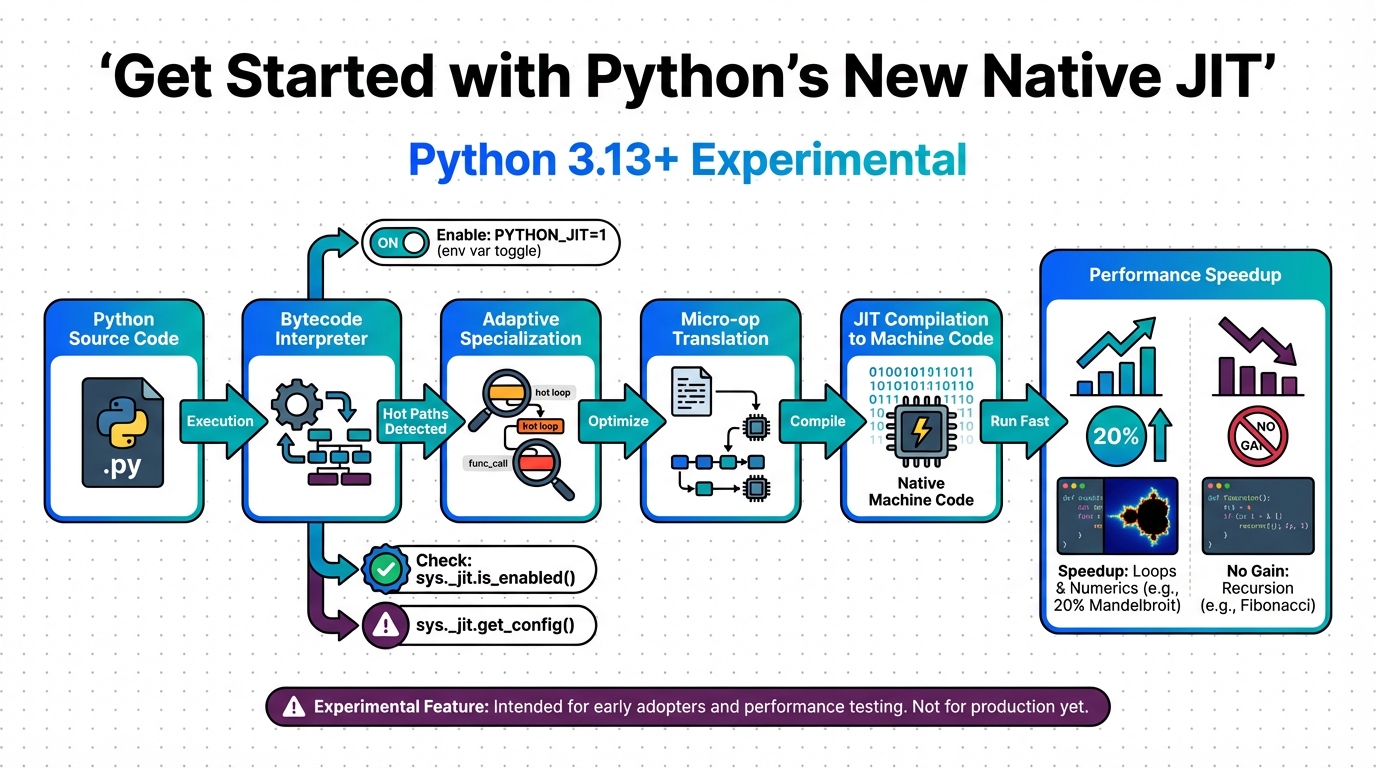
At its heart, JIT compilation is like a smart translator that watches your code run and optimizes the parts that get used a lot. In Python 3.15, this native JIT is experimental but built right into the interpreter. It traces execution paths—basically, it records how your code actually behaves—and converts those hot paths into machine code on the fly. No more interpreting every time; it’s compiled to native speed.
Lila: Metaphor time: Imagine a factory assembly line. Normally, workers (the interpreter) follow instructions slowly for every item. The JIT spots the repetitive tasks, builds a custom machine for them, and suddenly everything speeds up. It’s not magic—it’s just efficient reuse.
John: Diving deeper for the engineers: This JIT uses a tracing frontend that captures real execution, not estimates, leading to better optimizations. It’s off by default, but you enable it with a flag like PYTHON_JIT=1 or by compiling Python with --enable-experimental-jit. Trade-offs? It’s still maturing—some benchmarks show it’s slower than the interpreter in edge cases, as noted by core developer Ken Jin after 30 months of work. But for numerical loops or simulations, the ROI in speed is tangible, often rivaling external tools like Numba without the hassle.
[Important Insight] Remember, this isn’t a full compiler like in Java; it’s selective, focusing on performance bottlenecks.
Use Cases: Where This Shines in Real Life
Let’s get practical. Here are three everyday scenarios where Python’s native JIT can make a difference.
First, imagine you’re a hobbyist building a simulation game in Python—think modeling traffic flow or simple physics. Without JIT, those repeated calculations bog down. With it enabled, your loops run faster, making the game feel snappier without rewriting in another language.
Second, for data crunching: You’re analyzing a dataset of stock prices with basic stats. Traditional Python might take ages on large files, but JIT optimizes the math-heavy parts, cutting processing time and letting you iterate quicker on insights.
Third, web scraping scripts: If you’re pulling data from sites in a loop, the repetitive network calls and parsing can slow things. JIT speeds up the parsing logic, reducing overall runtime and making your automation more efficient for personal projects.
John: From an engineering lens, these use cases highlight trade-offs: Great for CPU-bound tasks, but if your bottleneck is I/O (like disk reads), JIT won’t help much. Always profile first—use tools like cProfile to identify hotspots.
Lila: Exactly—it’s like upgrading your bike’s gears for hills, but if you’re stuck in traffic, it’s not the fix.
Old Method vs. New Solution: A Quick Comparison
| Aspect | Old Method (Interpreter-Only) | New Solution (Native JIT) |
|---|---|---|
| Speed | Slower for repetitive tasks; line-by-line execution | Up to 20%+ faster on hot paths via on-the-fly compilation |
| Ease of Use | Simple, but requires external tools like Numba for speed | Built-in; just enable with a flag—no extras needed |
| Limitations | Consistent but unoptimized performance | Experimental; may be slower in some cases, still maturing |
| Best For | Quick scripts without performance needs | CPU-intensive loops in simulations or data processing |
Wrapping It Up: Your Next Steps to Faster Python
In summary, Python’s native JIT is a beginner-friendly way to squeeze more speed out of your code without abandoning the language’s simplicity. We’ve covered the basics, from why old Python felt slow to how JIT optimizes like a smart factory line, plus real use cases and a clear comparison. The key takeaway? It’s experimental, so test it on your workloads—speed gains vary, but the potential is exciting.
Lila: Start small: Download Python 3.15, enable the JIT, and run your favorite script. See the difference for yourself!
John: Mindset shift: Performance isn’t about hype; it’s about profiling and iterating. Dive in, but remember the trade-offs—it’s not a silver bullet, but a tool in your engineering arsenal.
References & Further Reading
- Get started with Python’s new native JIT | InfoWorld
- Python 3.14 Native JIT Tutorial: 10× Speed Without Numba | Medium
- Despite 30 months work, core developer says Python’s JIT compiler is often slower than the interpreter | DEVCLASS
- Understanding Python’s JIT Compiler | Python in Plain English