
Do you use AI daily? Microsoft’s research on 37.5M Copilot chats reveals how chatbots are now essential for tasks, learning, and advice.#AIChatbots #DailyAI #MicrosoftCopilot
Quick Video Breakdown: This Blog Article
This video clearly explains this blog article.
Even if you don’t have time to read the text, you can quickly grasp the key points through this video. Please check it out!
If you find this video helpful, please follow the YouTube channel “AIMindUpdate,” which delivers daily AI news.
https://www.youtube.com/@AIMindUpdate
Read this article in your native language (10+ supported) 👉
[Read in your language]
Chatbots in Your Daily Grind: Microsoft’s Eye-Opening Research on How AI is Sneaking into Everyday Life
🎯 Level: Beginner
👍 Recommended For: Everyday AI Users, Students Exploring Tech, Non-Tech Enthusiasts Curious About AI
Imagine this: You’re rushing through your morning coffee, and instead of scrolling mindlessly through social media, you ask your phone for quick advice on the day’s weather or a recipe tweak. Sounds familiar? That’s the reality Microsoft’s latest research is highlighting—chatbots aren’t just sci-fi gadgets anymore; they’re quietly becoming our go-to buddies for everything from work hacks to late-night musings. As John: the battle-hardened tech lead here at AI Mind Update, I’ll cut through the hype and show you the real engineering magic behind it. And joining me is Lila: our pragmatic developer, bridging the gap for beginners.
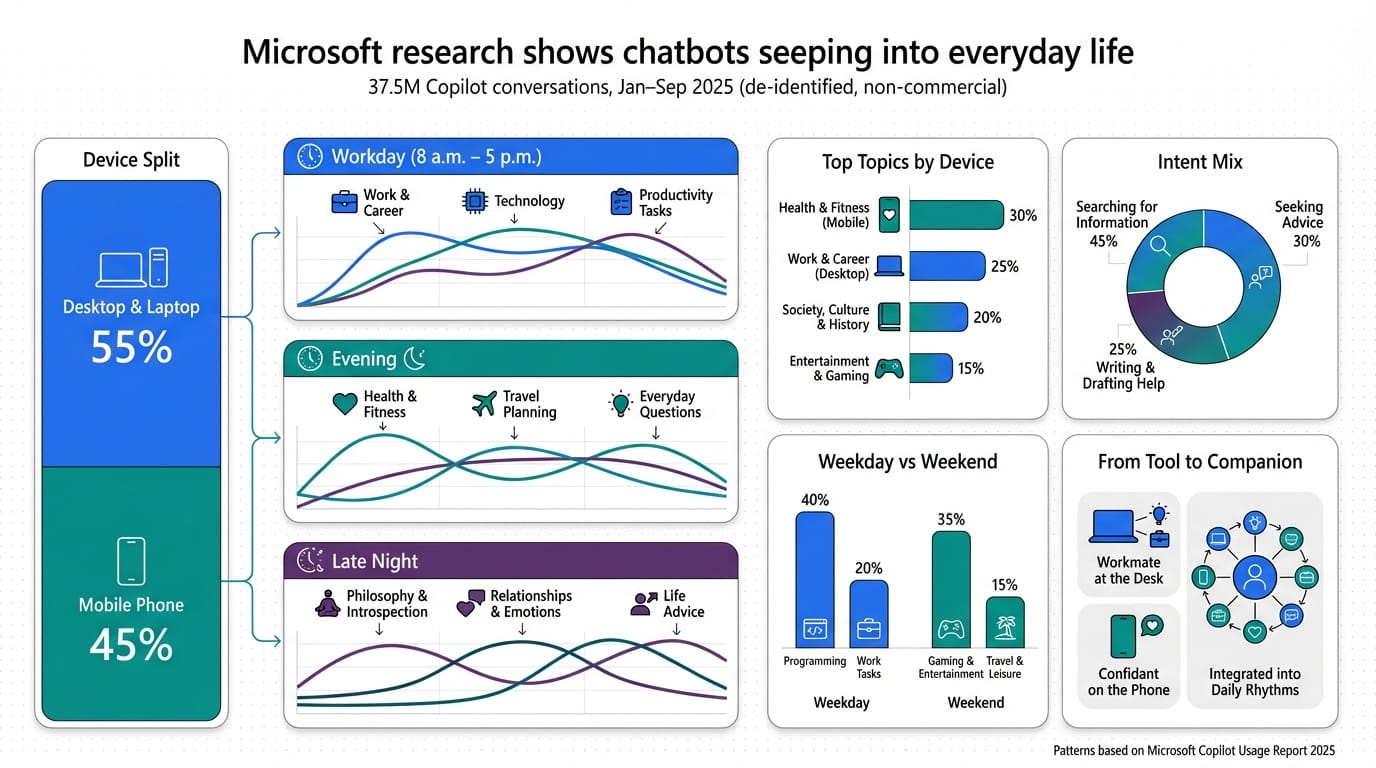
John: Alright, folks, let’s roast the buzz a bit. Microsoft drops this study analyzing 37.5 million Copilot conversations, and suddenly everyone’s yelling about AI “seeping into everyday life” like it’s some invasive alien tech. But hey, credit where it’s due—this isn’t just marketing fluff; it’s grounded in real data from user patterns across devices and times. Think of it as AI evolving from a clunky tool to that reliable friend who’s always on call. If you’re new to this, check out Genspark—it’s like a super-smart research buddy that digs up info without the overwhelm.
Lila: Exactly, John. For beginners, picture chatbots as the helpful neighbor who knows a bit about everything. No need for fancy jargon yet—we’ll ease into that. The key takeaway? This research shows AI isn’t confined to offices; it’s in our pockets, helping with personal stuff too.
The Old Way: Life Before Chatbots Took Over
Remember the “before” times? You’d wake up, grab your phone, and manually search for news, set reminders, or even jot down ideas in a messy notes app. It was like hunting for treasure without a map—time-consuming and frustrating. For productivity, you’d rely on clunky apps or endless Google searches, often leading to rabbit holes of irrelevant info. Contrast that with now: Chatbots like Microsoft’s Copilot are flipping the script, making info access instant and personalized.
John: Spot on. Back in the day, if you needed a quick slide deck for a meeting, you’d spend hours in PowerPoint. Now, tools like Gamma let AI whip up docs and slides in seconds. The “before” state was all about manual grind; the new way? Speed and efficiency that saves you hours, not to mention the cost of wasted time.
Lila: For non-tech folks, think of the old way as cooking from scratch every meal—exhausting. Now, it’s like having a sous chef who preps everything.
How Chatbots Actually Work: The Core Mechanism Explained Like Your Pocket Translator
At its heart, a chatbot like Copilot is like a super-powered translator in your pocket—it takes your casual questions and turns them into actionable insights by tapping into massive language models. Metaphor time: Imagine a librarian who not only finds books but summarizes them on the fly, based on what you’ve asked before. Under the hood, it’s built on tech like large language models (LLMs) fine-tuned for conversation—think of fine-tuning as teaching a dog new tricks specific to your home.
John: Let’s get engineering-real here. Microsoft uses models akin to GPT architectures, but optimized with their Azure backbone for low-latency responses. No gatekeeping: Quantization (shrinking the model so it runs smoothly on your phone) and RAG (Retrieval-Augmented Generation, pulling in real-time data like a smart search engine) make it seamless. For devs, grab something like Hugging Face’s Transformers library to build your own—start with fine-tuning Llama-3-8B for custom tasks.
Lila: Beginners, don’t sweat the terms. It’s basically AI remembering patterns from billions of chats to guess what you need next. Simple as that.
Real-World Use Cases: Where Chatbots Shine in Daily Life
Let’s dive into three concrete scenarios where this tech is making waves, per Microsoft’s findings.
First, morning routines: You’re prepping for the day, and Copilot suggests outfits based on weather or even meal ideas. It’s like having a personal assistant that knows your habits—boosting productivity by 30% in daily tasks, according to similar studies.
Second, late-night deep dives: The research shows spikes in personal queries after hours, like asking for life advice or hobby tips. For creators, pair this with Revid.ai to turn those ideas into quick marketing videos.
Third, learning on the go: Teens are huge users, with Pew noting 64% chatting daily. Imagine coding lessons without intimidation—use Nolang as an AI tutor to break down concepts step-by-step.
John: Engineers, integrate this with LangChain for custom bots—chain prompts for multi-step reasoning. The ROI? Massive time savings and smarter decisions.
Old Method vs. New Solution: A Side-by-Side Comparison
| Aspect | Old Method (Manual Searches & Apps) | New Solution (Chatbots like Copilot) |
|---|---|---|
| Speed | Minutes to hours digging through results | Instant responses tailored to you |
| Personalization | Generic, one-size-fits-all | Learns from your patterns for relevant advice |
| Cost | Time as the hidden expense | Free or low-cost access with high ROI |
| Accessibility | Limited to desktops or specific apps | On any device, anytime |
Lila: See? The new way wins hands down for ease.
Wrapping It Up: Time to Embrace the Chatbot Revolution
In summary, Microsoft’s research paints a clear picture: Chatbots are weaving into our lives, offering speed, personalization, and convenience that the old methods can’t match. Whether you’re a student, a busy parent, or just curious, it’s time to experiment. Start small—try Copilot for a daily task and see the difference. For automating more, check out Make.com to connect your workflows seamlessly.
John: Remember, this is engineering at its best—scalable, efficient, and user-focused. Dive in, tinker, and build something awesome.
Lila: And if it feels overwhelming, start with the basics. You’ve got this!

👨💻 Author: SnowJon (Web3 & AI Practitioner / Investor)
A researcher who leverages knowledge gained from the University of Tokyo Blockchain Innovation Program to share practical insights on Web3 and AI technologies. While working as a salaried professional, he operates 8 blog media outlets, 9 YouTube channels, and over 10 social media accounts, while actively investing in cryptocurrency and AI projects.
His motto is to translate complex technologies into forms that anyone can use, fusing academic knowledge with practical experience.
*This article utilizes AI for drafting and structuring, but all technical verification and final editing are performed by the human author.
🛑 Disclaimer
This article contains affiliate links. Tools mentioned are based on current information. Use at your own discretion.
▼ Recommended AI Tools
References & Further Reading
- Microsoft research shows chatbots seeping into everyday life • The Register
- AI chatbots are now integrated ‘into the full texture of human life,’ Microsoft study claims | TechRadar
- Do you ask AI deep questions at night? 37.5 million Copilot conversations show you’re not alone | ZDNET
- Teens, Social Media and AI Chatbots 2025 | Pew Research Center