Unlock Cinematic Magic: How Kling 2.6 Pro on Artlist is Revolutionizing AI Video Creation for Everyday Creators
🎯 Level: Beginner
👍 Recommended For: Aspiring Video Creators, Social Media Enthusiasts, Hobby Filmmakers
Imagine you’re a budding YouTuber with a killer idea for a short film, but you’ve got zero budget for cameras, actors, or editing software. You’re staring at a blank screen, wondering how to bring your vision to life without breaking the bank. That’s the relatable struggle many creators face every day. But what if I told you there’s a tool that turns your wildest ideas into stunning videos complete with sound, all powered by AI? Enter Kling 2.6 Pro on Artlist – the latest update that’s making high-quality video generation as easy as snapping a photo. And if you’re looking to dive deeper into tools like this, check out Genspark, an AI-powered search agent that can help you research and discover even more creative gems.
John: Alright, folks, let’s cut through the hype. AI video tools have been buzzing like a swarm of overcaffeinated bees lately, promising Hollywood magic from your laptop. But Kling 2.6 Pro? It’s not just fluff – it’s got some serious engineering muscle under the hood. We’re talking native audio generation that syncs perfectly with visuals, fluid motions that don’t look like a robot’s awkward dance, and cinematic quality that could fool your grandma into thinking you hired a pro crew.
Lila: John, you’re right, but let’s keep it simple for our beginners. Think of Kling 2.6 Pro as your personal movie studio in a box. You input a description or an image, and it whips up a video with sounds, music, and effects – no fancy equipment needed!
One of the standout features is its native audio generation, which means videos come out with built-in speaking, singing, or sound effects that match the action perfectly. And get this: it supports both English and Chinese, opening doors for global creators. Plus, with improved motion fidelity, your characters move naturally, not like stiff puppets. The speed is a game-changer too – generate clips in minutes, saving hours of manual work. As for cost, it’s integrated into Artlist’s platform, making it affordable for indie creators without shelling out for expensive subscriptions elsewhere. And the ROI? If you’re monetizing content, this could boost your output and engagement tenfold.
The “Before” State: Life Without AI Video Magic
Remember the old days of video creation? You’d sketch storyboards on napkins, beg friends to act in your scenes, and spend endless nights wrestling with clunky software like outdated versions of Adobe Premiere. It was a grind – expensive gear, steep learning curves, and results that often looked amateurish no matter how hard you tried. Contrast that with today’s AI-driven world, where tools like Kling 2.6 Pro handle the heavy lifting. For organizing your ideas before jumping in, tools like Gamma can help you create quick docs or slides to plan your video projects effortlessly.
John: Oh man, the “before” era was like trying to build a spaceship with duct tape and hope. You’d pour in hundreds of hours for a mediocre clip, and forget about adding realistic audio without a sound booth. Now, Kling 2.6 Pro flips the script – it’s like having a team of VFX experts on speed dial.
Lila: Exactly! For beginners, it’s the difference between giving up on your dream project and actually sharing it with the world.
Core Mechanism: How Kling 2.6 Pro Works Its Magic
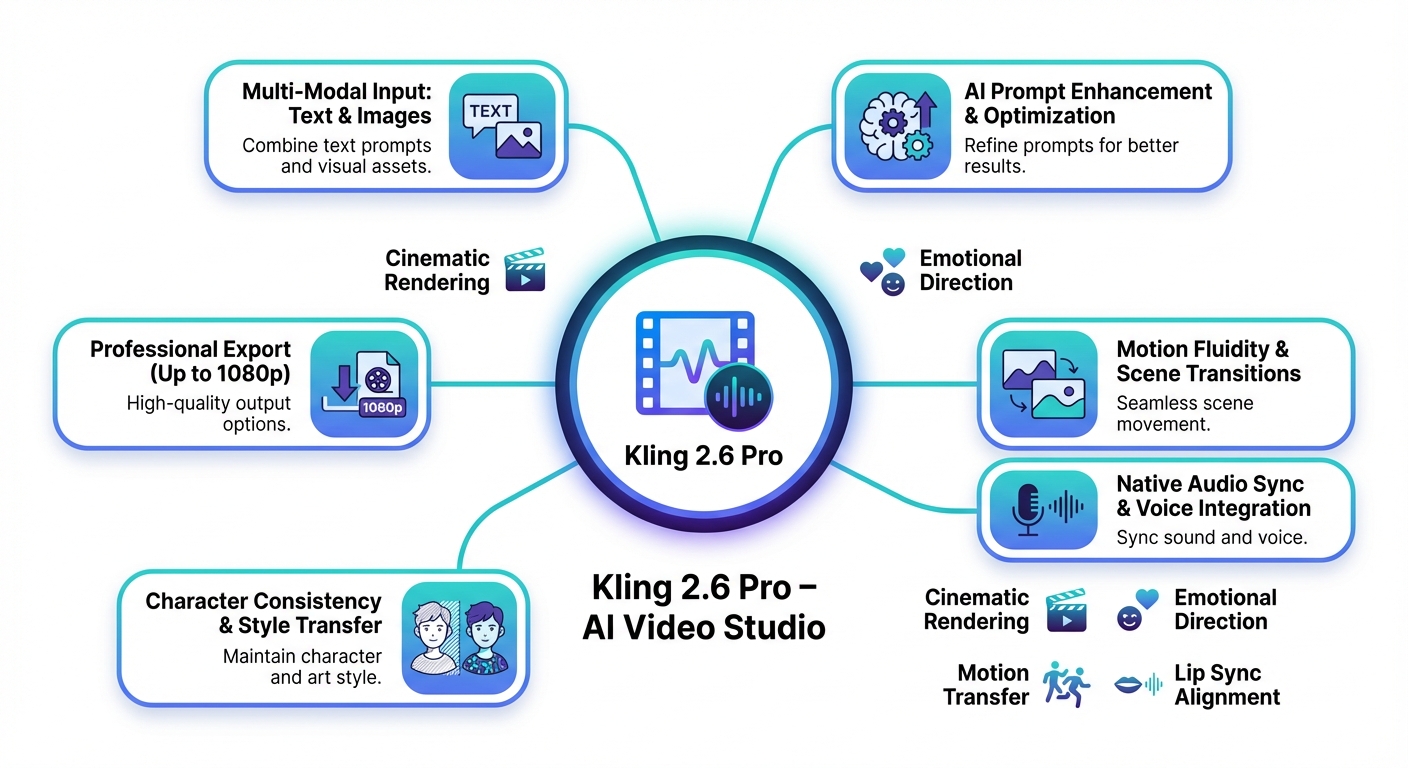
At its heart, Kling 2.6 Pro is like a magical chef in your kitchen – you give it ingredients (like text prompts or images), and it cooks up a full-course video meal, complete with audio sides. It uses advanced AI models to generate visuals from text or images, ensuring cinematic quality with fluid motions. The native audio? That’s the secret sauce, syncing sounds seamlessly without extra editing.
John: Diving deeper for the tech-curious: This builds on models like those from Hugging Face, probably fine-tuned with something akin to LoRA (Low-Rank Adaptation – a way to tweak big models efficiently without retraining everything). It processes inputs through multi-modal networks, blending vision and audio generation. Recent updates, based on web info, emphasize better control and fidelity, making it a step up from earlier versions.
Lila: Think of it as a translator that turns your words into a living story. No need for coding – just type, generate, and refine!
Real-World Use Cases: Bringing Ideas to Life
Let’s get concrete. First, imagine you’re a social media marketer creating promo videos. With Kling 2.6 Pro, input a product description, and out comes a polished clip with voiceover and effects – perfect for Instagram Reels. For more advanced video needs, pair it with Revid.ai to turn articles into viral shorts.
Second, educators can craft engaging explainer videos. Describe a history lesson, and Kling generates animated scenes with narration in English or Chinesewhere, saving time by skipping the queue for Chinese users. It’s a great tool for learning without needing coding skills – try Nolang if you’re diving into AI for teaching.
Third, indie filmmakers: Turn a single image into a full scene with dynamic camera movements and sound, accelerating prototyping. It’s like having a storyboard that comes alive!
John: These aren’t hypotheticals – web reports from Artlist highlight how creators are using it for cinematic outputs, with features like start/end frame control echoing advanced tools like LangChain for orchestration.
Lila: Start small: Experiment with a simple prompt like “a cat chasing a laser pointer” and watch the magic unfold.
Old Method vs. New Solution: A Side-by-Side Comparison
| Aspect | Old Method (Traditional Video Editing) | New Solution (Kling 2.6 Pro on Artlist) |
|---|---|---|
| Time to Create a Video | Hours to days (shooting, editing, audio syncing) | Minutes with AI generation |
| Cost | High (equipment, software licenses) | Affordable via Artlist subscription |
| Audio Integration | Manual recording and syncing | Native, automatic generation |
| Motion Quality | Limited without pro skills | Fluid and cinematic |
| Accessibility | Requires technical expertise | User-friendly for beginners |
Wrapping It Up: Your Next Step in AI Video Creation
In summary, Kling 2.6 Pro on Artlist is democratizing video production, offering speed, quality, and affordability that were once out of reach. Whether you’re a newbie or a seasoned creator, it’s time to experiment and elevate your content. Head over to Artlist and give it a spin – your audience will thank you. For automating your workflow around these videos, check out Make.com to streamline sharing and more.
John: Don’t sleep on this – it’s the raw engineering evolution we’ve been waiting for. Dive in, build something epic.
Lila: Start simple, have fun, and watch your creativity soar!

👨💻 Author: SnowJon (Web3 & AI Practitioner / Investor)
A researcher who leverages knowledge gained from the University of Tokyo Blockchain Innovation Program to share practical insights on Web3 and AI technologies. While working as a salaried professional, he operates 8 blog media outlets, 9 YouTube channels, and over 10 social media accounts, while actively investing in cryptocurrency and AI projects.
His motto is to translate complex technologies into forms that anyone can use, fusing academic knowledge with practical experience.
*This article utilizes AI for drafting and structuring, but all technical verification and final editing are performed by the human author.
🛑 Disclaimer
This article contains affiliate links. Tools mentioned are based on current information. Use at your own discretion.
▼ Recommended AI Tools