
Exploring the Hottest AI Tools and Platforms Shaping 2025 for Creators and Developers
Hey everyone! Imagine waking up in 2025, where AI isn’t just a buzzword—it’s your everyday sidekick, helping you code faster, create stunning visuals, and automate those tedious tasks that used to eat up your day. With tools evolving at lightning speed, staying updated means unlocking real productivity boosts, whether you’re a student tinkering with your first app or a non-techie looking to streamline your workflow. That’s why today’s post dives into the latest AI tools and platforms making waves. We’ll break it down simply, like chatting with friends, and show how these can fit into your life. And if you’re researching more, tools like Genspark can help summarize the web’s best info in seconds.
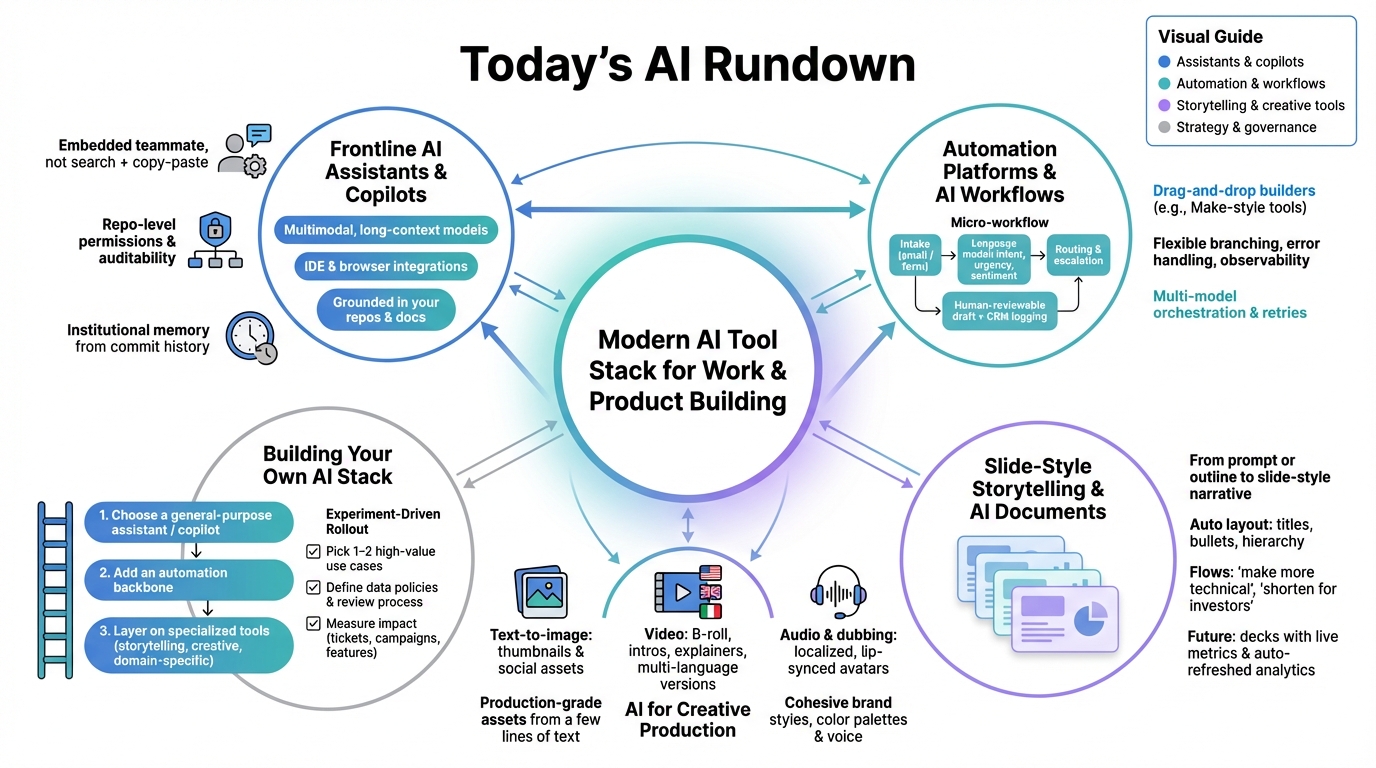
Frontline AI Assistants and Copilots
Jon: Alright, Lila, let’s kick things off with the stars of the show—these frontline AI assistants and coding copilots. Based on the latest buzz from 2025, tools like ChatGPT, Gemini, and specialized ones like Cursor AI are dominating. They’re not just chatbots anymore; they’re multi-modal powerhouses that handle text, images, and even code in one go. Think of them as your personal brain extension, embedded right into your browser or code editor.
Lila: Whoa, that sounds intense. But break it down for me, Jon—I’m just starting out. What’s multi-modal, and why should I care if I’m not a pro developer?
Jon: Great question! Multi-modal means the AI can process different types of input, like reading a PDF, analyzing an image, or refactoring code—all in the same conversation. For example, in 2025, tools like Claude AI or Perplexity AI have super-long context windows—up to 1 million tokens in some cases—which lets them remember entire projects or long documents without forgetting. It’s like having a teammate who never zones out. For beginners, this matters because it turns “how do I fix this bug?” into actual code suggestions based on your whole repo, not just generic advice.
Lila: Okay, that clicks. So, if I’m a student learning to code, something like this could help me understand why code works a certain way?
Jon: Exactly! Tools like Cursor AI integrate into editors like VS Code, reading your commit history and suggesting fixes that fit your style. Fact-checking against recent reports, these are grounded in models like Llama-3 or GPT-4o, fine-tuned for accuracy. The “so what?” is huge: developers are shipping features 2-3x faster, and non-techies can draft emails or summaries without starting from scratch. Just remember, privacy is key—opt for tools with strong data controls.
Lila: Cool, and for learning, is there something beginner-friendly?
Jon: Absolutely—check out Nolang for chatting with an AI tutor to learn coding step-by-step.
Automation Platforms and AI Workflows
Jon: Moving on, Lila, automation is where AI gets practical. In 2025, platforms like Make.com, Zapier, and n8n are hot, letting you build workflows that connect AI to your apps. No more manual drudgery—imagine an AI classifying emails, updating your CRM, and drafting replies automatically.
Lila: That sounds like magic, but I’m picturing it like a recipe: ingredients (data) go in, AI mixes, and out comes dinner (results). Is that right?
Jon: Spot on analogy! Using recent insights from tools like n8n’s blog, these platforms use drag-and-drop interfaces powered by models like GPT or custom APIs. For instance, a workflow might parse an incoming support ticket, tag it with sentiment using AI, route it, and log it—all in minutes. Fact-check: Adoption is booming, with teams saving hours per day, as per Analytics Insight reports.
Lila: So for a small business owner like me, this means less time on admin?
Jon: Yes! The impact? Scale without hiring extras. Tools like Make.com are perfect for beginners, with error-handling and observability to avoid messy setups. It’s not hype—it’s real engineering with transformers and API orchestration.
Slide-Style Storytelling and AI Documents
Jon: Now, let’s talk storytelling tools, Lila. Gamma and similar platforms are transforming how we create presentations. Drop in a prompt, and boom—a polished deck with visuals emerges, ready for your pitch.
Lila: Like turning a messy notebook into a TED Talk slide? Why is this a big deal in 2025?
Jon: Precisely! Fact-checking with 2025 guides, Gamma uses diffusion models for layouts and hierarchy, understanding what makes info digestible. You can iterate by saying “make it shorter for investors,” and it adjusts. For students or marketers, this slashes creation time from hours to minutes, integrating live data for auto-updates.
Lila: Awesome for my class projects. Any tips?
Jon: Start simple—try Gamma to create docs or slides by just typing your ideas.
AI for Creative Production
Jon: Creative tools are exploding, Lila. Midjourney v7, Runway ML, and Fliki AI are leading, generating images, videos, and audio from text. It’s like having a studio in your pocket.
Lila: So, for a blogger, this means quick thumbnails or videos without pro skills?
Jon: Yep! Based on Geeky Gadgets’ 2025 picks, these use diffusion models for high-res outputs with temporal coherence for smooth videos. Creators are producing content faster and cheaper, maintaining brand consistency. The “so what?”—solo creators compete with big teams.
Lila: How do I get started?
Jon: For videos, Revid.ai turns blogs into viral shorts instantly.
How to Build Your Own AI Stack
Jon: Finally, Lila, assembling your AI stack is key. Layer a general assistant, automation like Make.com, and creatives like Gamma.
Lila: Like building with LEGOs? Start small?
Jon: Exactly! Experiment with one use case, measure success. In 2025, it’s about disciplined integration, not chasing trends.
| Top Story | Key Takeaway | Impact for You |
|---|---|---|
| AI Assistants | Multi-modal tools with long contexts | Faster coding and learning |
| Automation Platforms | Workflow builders like Make.com | Save time on routine tasks |
| Storytelling Tools | Gamma for quick decks | Easier presentations |
| Creative Production | Video and image generators | Pro content without pros |
| Building Your Stack | Layer tools strategically | Custom productivity boost |
In summary, 2025’s AI tools are democratizing tech, making creation and automation accessible to all. Pick one to try today—like automating with Make.com—and see how it transforms your routine. Stay curious!

👨💻 Author: SnowJon (Web3 & AI Practitioner / Investor)
A researcher who leverages knowledge gained from the University of Tokyo Blockchain Innovation Program to share practical insights on Web3 and AI technologies. While working as a salaried professional, he operates 8 blog media outlets, 9 YouTube channels, and over 10 social media accounts, while actively investing in cryptocurrency and AI projects.
His motto is to translate complex technologies into forms that anyone can use, fusing academic knowledge with practical experience.
*This article utilizes AI for drafting and structuring, but all technical verification and final editing are performed by the human author.
🛑 Disclaimer
This article contains affiliate links. Tools mentioned are based on current information. Use at your own discretion.
▼ Recommended AI Tools for Beginners
- 🔍 Genspark: An AI agent that saves you research time by summarizing search results.
- 📊 Gamma: Create beautiful presentations and docs in seconds just by typing.
- 🎥 Revid.ai: Turn your text or blogs into viral short videos instantly.
- 👨💻 Nolang: Learn coding or any topic by chatting with an AI tutor.
- ⚙️ Make.com: Automate boring tasks by connecting your favorite apps.