
Struggling with video editing? Veo 4 could transform your workflow, making cinematic AI video faster & cheaper for creators.#Veo4 #AIVideo #CreatorTools
Quick Video Breakdown: This Blog Article
This video clearly explains this blog article.
Even if you don’t have time to read the text, you can quickly grasp the key points through this video. Please check it out!
If you find this video helpful, please follow the YouTube channel “AIMindUpdate,” which delivers daily AI news.
https://www.youtube.com/@AIMindUpdate
Read this article in your native language (10+ supported) 👉
[Read in your language]
Veo 4: What Creators Can Realistically Expect from the Next Generation of AI Video
🎯 Level: Beginner/Intermediate
👍 Recommended For: Aspiring content creators, social media influencers, independent filmmakers
John: Imagine you’re a budding YouTuber, staring at a blank screen, trying to piece together a video from scratch. You’ve got ideas exploding in your head, but the editing software feels like wrestling a grumpy octopus. Sound familiar? That’s the daily grind for many creators today. But what if AI could turn your wildest concepts into polished videos faster than you can say “action”? Enter Veo 4, Google’s next big leap in AI video generation. We’re diving into what this tech really means for you – no hype, just the real deal. And hey, if you’re researching this, check out Genspark – it’s like having a super-smart sidekick that pulls together the latest info without the endless scrolling.
Lila: Totally relatable, John. Let’s break it down like we’re chatting over coffee. Veo 4 isn’t out yet, but based on the buzz and leaks from sources like Artlist’s blog, it’s shaping up to be a game-changer for anyone who makes videos. Think of it as upgrading from a flip phone to a smartphone – suddenly, everything’s easier and more powerful.
The Hype vs. the Reality: Cutting Through the Noise
John: Alright, let’s roast the hype a bit. Every new AI model gets paraded as the “end of human creativity,” but Veo 4? It’s more like a turbocharged assistant. From what we’ve seen in previews, it’s building on Veo 3.1’s realism, adding better control over scenes, emotions, and even physics. Creators can expect faster generation times – we’re talking minutes instead of hours – and lower costs for indie folks. But don’t quit your day job; it’s not perfect yet.
Lila: Exactly. If you’re new to this, AI video gen is like a magic sketchpad: you describe a scene in words, and it draws the video for you. Veo 4 might let you tweak details mid-process, like directing a virtual actor.
The “Before” State: Life Without Veo-Level AI
John: Remember the old days? Shooting footage meant lugging cameras, hiring actors, and spending weeks in post-production. Tools like Adobe Premiere were great, but they demanded skills and time. Now, with AI, it’s flipping the script. For quick docs or slides to plan your shoots, try Gamma – it automates that brainstorming phase beautifully.
Lila: Yeah, before AI, a simple promo video could eat up hundreds of dollars in gear and hours. Veo 4 promises to slash that, making pro-level output accessible to hobbyists.
Core Mechanism: How Veo 4 Works (Like a Movie Director in Your Pocket)
John: Let’s geek out without the jargon overload. At its heart, Veo 4 is like a master chef with an infinite pantry. You give it a recipe (your text prompt), and it whips up a video using ingredients like advanced neural networks – think fine-tuned models based on something like Llama-3-8B for understanding language, combined with diffusion tech (that’s the magic that turns noise into coherent images, frame by frame). It’s not just slapping frames together; it’s simulating real-world physics, like how water splashes or fabric moves.
Lila: ELI5 version: Imagine a translator in your pocket that turns your story ideas into a full movie. It “learns” from massive datasets, so when you say “a dragon flying over a castle at sunset,” it gets the lighting, motion, and drama right. Tools like Hugging Face might even let you tinker with open-source versions someday.
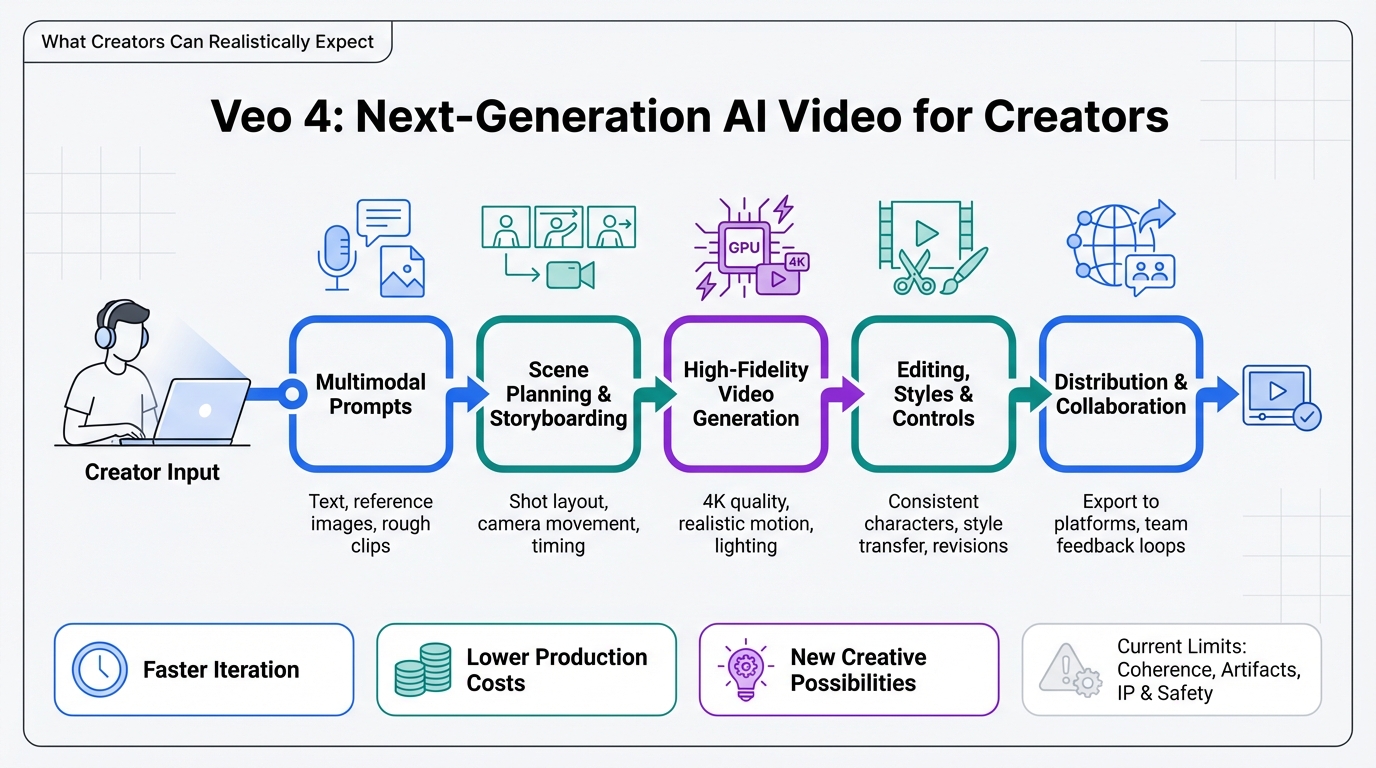
Use Cases: Real-World Scenarios for Creators
John: Let’s get practical. First scenario: You’re a social media influencer needing quick reels. Veo 4 could generate custom backgrounds or effects from text, saving you from stock footage hunts. Pair it with Revid.ai for marketing tweaks.
Lila: Second: Educational content creators. Want a video explaining quantum physics with visualizations? Input the script, and Veo 4 animates it. For learning coding on the side, Nolang is a great AI tutor to complement this.
John: Third: Indie filmmakers prototyping scenes. Test wild ideas without a budget – like a sci-fi chase – and iterate fast. The ROI here is huge: less waste, more creativity.
Comparison: Old Method vs. New Solution
| Aspect | Old Method (Traditional Video Production) | New Solution (Veo 4 AI) |
|---|---|---|
| Time to Create | Days or weeks | Minutes to hours |
| Cost | High (gear, crew, software) | Low (subscription-based AI access) |
| Creative Control | Manual, skill-dependent | Intuitive prompts with fine-tuning |
| Realism & Quality | Depends on resources | Cinematic, with physics simulation |
Lila: See? The new way democratizes video making.
Conclusion: Get Ready to Create
John: Veo 4 isn’t just tech; it’s a creativity booster. Expect more realism, speed, and accessibility, but remember, it’s a tool – your ideas drive it. Start experimenting with current AI like Veo 3 via platforms, and automate your workflow with Make.com to integrate it seamlessly. What are you waiting for? Dive in and make something amazing.
Lila: Absolutely. The future of video is here – grab it!

👨💻 Author: SnowJon (Web3 & AI Practitioner / Investor)
A researcher who leverages knowledge gained from the University of Tokyo Blockchain Innovation Program to share practical insights on Web3 and AI technologies. While working as a salaried professional, he operates 8 blog media outlets, 9 YouTube channels, and over 10 social media accounts, while actively investing in cryptocurrency and AI projects.
His motto is to translate complex technologies into forms that anyone can use, fusing academic knowledge with practical experience.
*This article utilizes AI for drafting and structuring, but all technical verification and final editing are performed by the human author.
🛑 Disclaimer
This article contains affiliate links. Tools mentioned are based on current information. Use at your own discretion.
▼ Recommended AI Tools
▼ AI Tools for Creators & Research (Free Plans Available)
- 🔍 Free AI Search Engine & Fact-Checking
👉 Genspark - 📊 Create Slides & Presentations Instantly (Free to Try)
👉 Gamma - 🎥 Turn Articles into Viral Shorts (Free Trial)
👉 Revid.ai - 🗣️ Generate Explainer Videos without a Face (Free Creation)
👉 Nolang - ⚙️ Automate Your Workflows (Start with Free Plan)
👉 Make.com
▼ Access to Web3 Technology (Infrastructure)
- Setup your account for Web3 services
👉 Global Crypto Exchange Guide (Free Sign-up)
*This description contains affiliate links.
*Free plans and features are subject to change. Please check official websites.
*Please use these tools at your own discretion.
References & Further Reading
- Veo 4: What to Expect from Google’s Next AI Model – Artlist Blog
- Google Cloud’s Veo Redefines AI Video Generation with Unprecedented Realism and Control
- Veo 3 AI Video Generator – Try Now | Leonardo.Ai
- How to meta prompt with Gemini for better Veo videos
- Google Veo 3.1: The Ultimate Guide to AI Video Generation in 2025