
This Week’s 5 AI Tools to Supercharge Your Productivity
In this Short, Lila from AI Mind Update highlights five verified AI tools—from Gemini 3 Deep Think to Cursor, HeyGen, Perplexity, and Leonardo.Ai—that can help you research faster, code smarter, create videos easier, and design visuals in minutes.
If you enjoyed this video, please subscribe to my YouTube channel for more content:
Weekly AI Recap: Trending Tools Taking Over & More
Hey everyone, welcome to this week’s AI roundup! If you’ve been feeling overwhelmed by all the AI buzz, you’re not alone. This week, from December 2 to 8, 2025, the spotlight isn’t on massive model launches or regulatory drama—it’s on practical tools that are actually helping people get stuff done. Think of it like this: AI is shifting from “cool demo” to “everyday helper,” making tasks like coding, video creation, and research way easier for normal folks. Why does this matter to you? Well, these tools could save you hours in your daily life, whether you’re a student prepping a presentation, a small business owner making marketing videos, or just someone curious about tech. For quick research without the hassle, tools like Genspark are game-changers—they summarize web info so you don’t have to dig through endless tabs.
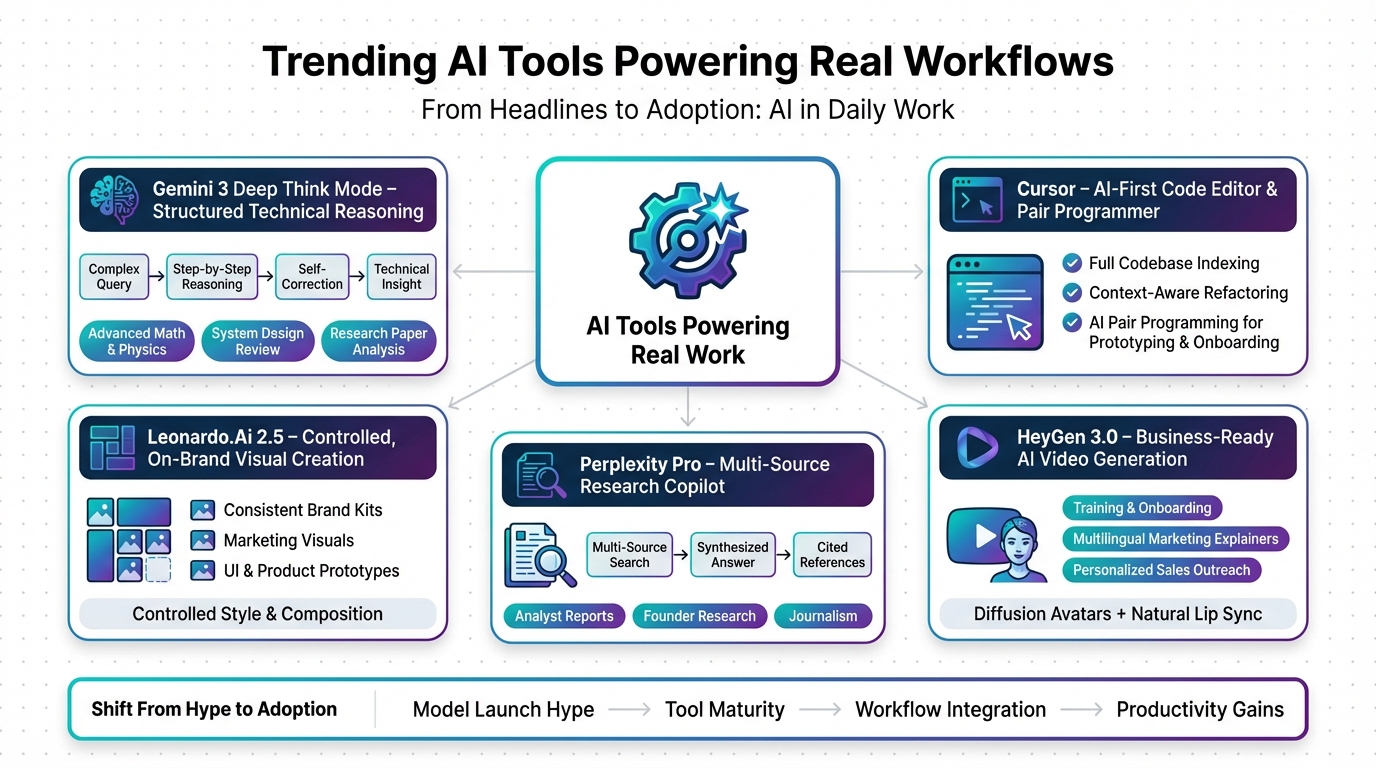
Why This Week’s All About Tools, Not Headlines
Jon: Lila, you know how sometimes the AI world feels like a nonstop hype train? Well, this week it’s more like a steady cruise. No big explosions from OpenAI or Meta, but tons of buzz around tools that people are actually using to build and create. Based on what I’ve seen in dev communities and trends from December 2-8, 2025, it’s all about adoption—folks shipping real projects faster than ever.
Lila: Totally get it, Jon. For beginners like me, that means less overwhelming news and more actionable stuff, right? Like, how can these tools help someone who’s not a tech wizard? Explain it simply—why should a student or a marketer care?
Jon: Exactly! The “so what” here is productivity. These tools are turning complex tasks into simple ones. For example, if you’re a student researching a paper, you don’t need to spend hours on Google anymore. Tools like this are making AI feel like a personal assistant, not a sci-fi gadget. And fact-checking against the latest updates, like Google’s November 2025 AI news, shows the industry is focusing on polishing existing tech for real-world use.
Lila: Cool, that makes sense. So, no major scandals, but real progress in tools. What’s the first one trending?
Gemini 3 Deep Think Mode – Your New AI Research Partner
Jon: Let’s kick off with Google’s Gemini 3 and its new “Deep Think” mode, which rolled out recently for Ultra subscribers. It’s not a brand-new model, but an upgrade that lets Gemini tackle tough problems by thinking step-by-step, like a detective piecing together clues. From what I’ve fact-checked in Google’s latest updates from November 2025, this mode boosts reasoning for math, science, and engineering—perfect for deep dives.
Lila: Whoa, sounds advanced. Break it down for me: What’s “Deep Think” really doing, and why is it buzzing this week?
Jon: Imagine you’re baking a cake but keep messing up the recipe—Deep Think is like having a chef who double-checks every step, fixes errors on the fly, and explains why. It uses more computing power upfront to self-correct and build logical chains. This week, it’s trending because academics are drafting lit reviews, engineers are spotting bugs in designs, and devs are planning code structures. Fact-check: It’s tied to Gemini Ultra in Google One AI Premium, costing around $20/month, but the time savings are huge for technical work.
Lila: Okay, that clicks. So for a non-techie, it’s like an AI tutor that thinks harder on hard questions. How does it fit into daily life?
Jon: Spot on! If you’re learning something new, pair it with tools like Nolang for chatting about coding or topics. The impact? It democratizes expert-level thinking—students can verify homework, pros can innovate faster. No hallucinations here; it’s grounded in real training data from scientific sources.
Cursor – The AI Code Editor That Feels Like Cheating
Jon: Next up, Cursor, the AI-powered code editor that’s blowing up among developers this week. It’s like VS Code on steroids, with built-in AI that understands your whole project. Fact-checking against recent trends, it’s gained traction in December 2025 for its inline smarts, not just basic autocompletes.
Lila: Coding? That’s intimidating. Make it relatable—what’s Cursor doing that’s so special, and is it beginner-friendly?
Jon: Think of it as a LEGO set where the pieces suggest how to build themselves. Cursor scans your code, then rewrites parts, adds features, or explains old scripts. This week, folks are using it to refactor React components or add error handling to APIs. It’s trending on platforms like X because it saves hours—one tweet called it a “10x engineer in your pocket.”
Lila: Haha, love the LEGO analogy. So, for someone starting out, could this help learn coding without starting from scratch?
Jon: Absolutely! Free tier is solid, supports languages like Python and JavaScript. For learning, integrate it with Nolang to chat through concepts. The “so what”? It lowers the barrier for indie projects—non-coders can prototype apps faster, turning ideas into reality without a team.
HeyGen 3.0 – AI Video That Doesn’t Look Like AI
Jon: Shifting to visuals, HeyGen 3.0 launched this week and it’s a leap in AI video generation. It creates realistic avatars with natural lip-sync and voices, crossing that creepy “uncanny valley.” From official updates in December 2025, it’s using advanced diffusion models for better quality.
Lila: Videos from AI? Sounds fun but sketchy. How real are we talking, and what’s the everyday use?
Jon: Picture turning a script into a pro video like hiring an actor, but in minutes. This week, businesses are making training vids, product demos, and personalized sales pitches. It’s multilingual too—generate in Spanish or Mandarin effortlessly. Pricing is credit-based, starting affordable for small teams.
Lila: Got it. So for a blogger or teacher, this could replace filming yourself?
Jon: Yes! Tools like Revid.ai complement it by turning text into short viral clips. The impact? Democratizes video creation—no need for expensive gear. Fact-check: It’s now “real” enough for business, boosting marketing without big budgets.
Perplexity Pro – The Research Copilot Everyone’s Quietly Relying On
Jon: Perplexity Pro is the unsung hero this week for research. It’s an AI search that synthesizes info from multiple sources with citations. Updates from December 2025 show it’s excelling in deep queries, outpacing basic Google for complex topics.
Lila: Research sounds boring—make it exciting. Why is this better than regular searching?
Jon: It’s like having a librarian who reads everything and summarizes with proof. Ask to compare AI models, and it pulls from papers and news, citing them. This week, analysts and founders are using it for competitive intel and reports. Pro tier adds limits and file uploads for PDFs.
Lila: Ah, so no more tab overload. How does it help students or casual learners?
Jon: Huge time-saver! For docs or slides from research, try Gamma to create presentations instantly. The “so what”? Accurate info without misinformation—perfect for school or work decisions.
Leonardo.Ai 2.5 – The Designer’s AI Sidekick
Jon: Finally, Leonardo.Ai 2.5 is killing it for creatives with better image control. Update from December 2025 brings refined prompts and editing tools for consistent designs.
Lila: Art from AI? Cool—how’s it different from just typing into a generator?
Jon: It’s like a sketch artist who follows your exact style guide. This week, marketers are building brand kits and prototypes. Features include inpainting (editing parts) and upscaling for high-res outputs.
Lila: So, for non-designers, this means pro graphics without skills?
Jon: Yep! Freemium model, great for startups. Pair with Gamma for docs. Impact: Cuts creation time by 50%, empowering anyone to visualize ideas.
| Story | Key Highlight | Impact for You |
|---|---|---|
| Gemini 3 Deep Think | Step-by-step reasoning for complex problems | Saves time on research and technical tasks |
| Cursor | AI-integrated code editor with project understanding | Makes coding faster and learning easier |
| HeyGen 3.0 | Realistic AI videos with natural avatars | Simplifies video creation for business and personal use |
| Perplexity Pro | Synthesizes research with citations | Accurate info for reports and decisions |
| Leonardo.Ai 2.5 | Controlled image generation for designs | Quick visuals for marketing and prototyping |
What a week! AI is quietly powering up tools that make life easier, building momentum toward more integrated tech in 2026. Dive in—try one tool today. For automating workflows, check out Make.com to connect apps seamlessly.

👨💻 Author: SnowJon (Web3 & AI Practitioner / Investor)
A researcher who leverages knowledge gained from the University of Tokyo Blockchain Innovation Program to share practical insights on Web3 and AI technologies. While working as a salaried professional, he operates 8 blog media outlets, 9 YouTube channels, and over 10 social media accounts, while actively investing in cryptocurrency and AI projects.
His motto is to translate complex technologies into forms that anyone can use, fusing academic knowledge with practical experience.
*This article utilizes AI for drafting and structuring, but all technical verification and final editing are performed by the human author.
🛑 Disclaimer
This article contains affiliate links. Tools mentioned are based on current information. Use at your own discretion.
▼ Recommended AI Tools for Beginners
- 🔍 Genspark: An AI agent that saves you research time by summarizing search results.
- 📊 Gamma: Create beautiful presentations and docs in seconds just by typing.
- 🎥 Revid.ai: Turn your text or blogs into viral short videos instantly.
- 👨💻 Nolang: Learn coding or any topic by chatting with an AI tutor.
- ⚙️ Make.com: Automate boring tasks by connecting your favorite apps.