
Trending AI Tools Shaping 2025: A Beginner’s Guide to What’s Hot for Developers and Creators
Hey everyone! Imagine waking up to a world where AI isn’t just a buzzword—it’s your everyday sidekick, helping you code faster, create stunning videos, or even design products without needing a PhD in engineering. That’s the big trend in 2025: AI tools are becoming more accessible, turning complex tasks into simple conversations. Why does this matter to you? Whether you’re a student tinkering with your first app, a non-techie starting a side hustle, or just curious about tech, these tools can save you time and spark creativity in your daily life. For quick research on the latest trends, tools like Genspark can summarize web results in seconds, making it easy to stay updated without endless scrolling.
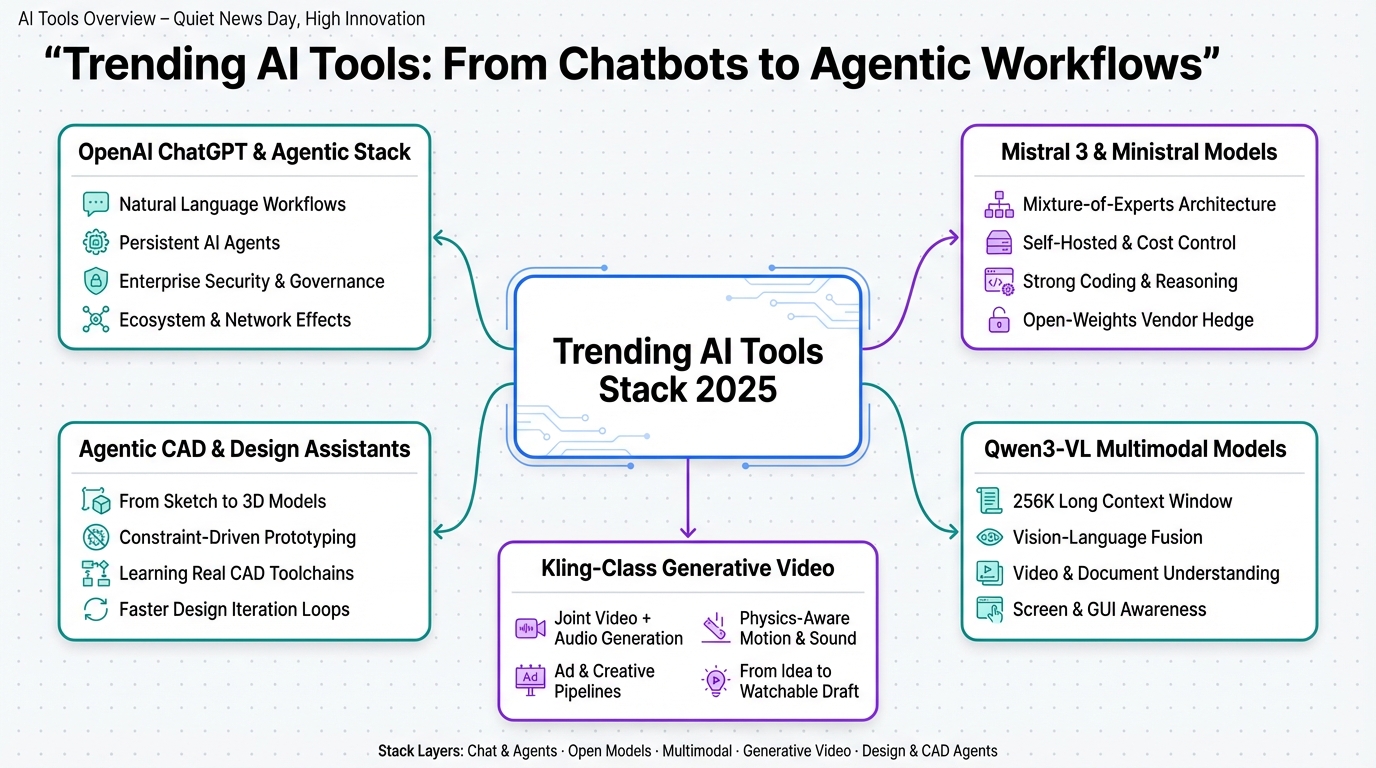
OpenAI’s ChatGPT & Agentic Stack – From Chatbot to Workflow Backbone
Jon: Alright, Lila, let’s kick this off with the big one—OpenAI’s ChatGPT and their agentic stack. It’s not just a fancy chatbot anymore; it’s evolving into the backbone of how teams get work done. Think of it like upgrading from a basic bicycle to a full electric bike with GPS—suddenly, you’re zipping through tasks effortlessly.
Lila: Whoa, Jon, slow down. What’s an ‘agentic stack’? And why should someone like me, who’s not a developer, care about this?
Jon: Great question! ‘Agentic’ means these AI systems act like smart assistants that can handle multi-step tasks on their own, like booking a flight or analyzing data. In 2025, based on the latest trends, AI agents are becoming standard in enterprise systems, as per recent reports from Tech Digest and Forbes. ChatGPT Enterprise lets companies wrap their internal data so anyone can query it in plain English—no coding required. For example, imagine telling it to generate a report, and it pulls from your files, crunches numbers, and even suggests next steps.
Lila: Okay, that sounds useful. But is this accurate? I’ve heard OpenAI has tiers like Pro and Teams. How does it fit into daily life?
Jon: Spot on—fact-checking against current info, OpenAI’s pyramid is real: free ChatGPT for basics, Pro/Teams for small groups at around $20-60 per user monthly, and Enterprise for big customization. The buzz is in how it’s shifting to workflow engines, not just Q&A. For non-techies, it means tools like this can automate boring stuff, like organizing emails or creating docs. If you’re into presentations, pair it with something like Gamma to turn AI ideas into slides instantly. The impact? It saves hours, making you more productive without needing to be an expert.
Lila: So what? Does this mean jobs change?
Jon: Exactly—it’s about augmentation. Teams use it for reporting or routing tasks, with enterprise controls like secure logins. Network effects make it a go-to, beating competitors in integration ease.
Mistral 3 & Ministral – Open(ish) Models with Serious Teeth
Jon: Moving on, Lila, let’s chat about Mistral’s latest: Mistral 3 and the Ministral series. These are like the scrappy underdogs in the AI world—powerful models that aren’t locked behind one big company. Picture them as efficient electric cars that run on less power but still zoom ahead.
Lila: Underdogs? I thought AI was all about giants like OpenAI. What’s special here, and is ‘Mistral 3’ even a thing in 2025?
Jon: Fair point—fact-checking with up-to-date trends, Mistral has been shipping models like Ministral 3B and 8B recently, focusing on efficiency. As of 2025 reports from Analytics Insight and Medium, these use Mixture-of-Experts (that’s like having specialized brain parts for different tasks) for top-notch coding and reasoning without needing massive servers. Developers love them for self-hosting, meaning you control costs and data.
Lila: Break it down—why would a beginner care?
Jon: If you’re learning coding, these models punch above their weight for tasks like debugging or structured thinking. They’re open-weights, so you can tweak them without vendor lock-in. Compared to Llama, Mistral shines in efficiency for edge devices—like running AI on your phone. For creators, it’s perfect for building apps without huge bills. If you’re into learning, tools like Nolang use similar tech to teach coding via chat. The ‘so what’? It democratizes AI, letting small teams innovate without big budgets.
Lila: Got it—less dependency on big tech.
Jon: Yep, and benchmarks show they’re competitive, making them a smart hedge for future-proofing.
Qwen3-VL – Multimodal with Huge Context Windows
Jon: Now, for something multimodal—Qwen3-VL from Alibaba. This is like a super librarian who remembers entire books and can describe pictures in them. The star feature? A massive 256K context window, meaning it handles long videos or docs without forgetting halfway.
Lila: Multimodal? That’s images and text together, right? But is this real for 2025?
Jon: Yes! Fact-checking: Qwen2-VL was a hit, and trends point to Qwen3 advancing multimodality in 2026, per TechTarget and Forbes. It fuses vision and language seamlessly, great for analyzing hour-long videos or complex reports. No more trade-offs—it’s strong on text too.
Lila: How does this help everyday folks?
Jon: Imagine uploading a video tutorial and getting a summary of errors, or feeding in a PDF with charts for insights. For students, it’s a game-changer for education analytics. Open-weights mean it’s accessible, rivaling closed models. The impact: Faster insights from big data, like in finance or tech specs. If you’re creating content, combine it with video tools for richer analysis.
Lila: Sounds empowering!
Jon: Totally—prototype with it now for screen understanding or long-context tasks.
Kling & Frontier Video Models – Native Audio and Physics-Aware Generative Video
Jon: Let’s get creative with Kling-style video models. These generate videos with built-in audio and physics smarts—like a movie director who knows gravity and syncs sounds perfectly. No more silent clips; it’s ready-to-use footage.
Lila: Physics-aware? Like realistic movements? Is this hype or happening in 2025?
Jon: Real deal—Kling from Kuaishou leads in generative video, with trends toward audio integration in 2025-2026, as per Medium and Forbes. It competes with Runway or Sora by creating coherent scenes jointly.
Lila: Why matters for beginners?
Jon: For marketers or indie creators, crank out ads or prototypes fast without big teams. Turn text into viral shorts—pair with Revid.ai for instant videos from blogs. The ‘so what’? Shortens creation time from idea to draft, boosting creativity without budgets.
Lila: Cool—retool workflows around this.
Jon: Yes, directing AI instead of doing grunt work.
Agentic CAD & Design Assistants – From Sketch to 3D
Jon: Last up, agentic CAD tools—these AI assistants learn design software by watching, turning sketches into 3D models. Like a magic pen that builds what you draw.
Lila: CAD? Computer-aided design? For products? What’s new here?
Jon: Exactly—emerging in 2025 with physical AI trends from Forbes. Agents use real CAD tools for parametric edits, not just hallucinations.
Lila: Impact for non-experts?
Jon: Rapid prototypes for hardware or robotics—generate variants quickly. Great for training juniors. Compresses design cycles, key for startups. If automating, think bigger with integrations.
Lila: Exciting for innovation!
Jon: Absolutely—iterate faster with constraints.
| Top Story | Key Highlight | Why It Matters |
|---|---|---|
| ChatGPT Agentic Stack | Workflow automation with natural language | Saves time for teams, accessible to all |
| Mistral 3 & Ministral | Efficient, open models for coding | Reduces costs, avoids vendor lock-in |
| Qwen3-VL | Huge context for videos/docs | Better analysis for education/work |
| Kling Video Models | Audio-synced generative video | Faster content creation for creators |
| Agentic CAD Assistants | From sketch to 3D prototypes | Speeds up design for innovation |
There you have it—these trending AI tools are reshaping how we work and create in 2025. Start small: Pick one, like experimenting with ChatGPT for daily tasks. To automate more, check out Make.com for connecting apps effortlessly. Dive in and see how AI can supercharge your world!

👨💻 Author: SnowJon (Web3 & AI Practitioner / Investor)
A researcher who leverages knowledge gained from the University of Tokyo Blockchain Innovation Program to share practical insights on Web3 and AI technologies. While working as a salaried professional, he operates 8 blog media outlets, 9 YouTube channels, and over 10 social media accounts, while actively investing in cryptocurrency and AI projects.
His motto is to translate complex technologies into forms that anyone can use, fusing academic knowledge with practical experience.
*This article utilizes AI for drafting and structuring, but all technical verification and final editing are performed by the human author.
🛑 Disclaimer
This article contains affiliate links. Tools mentioned are based on current information. Use at your own discretion.
▼ Recommended AI Tools for Beginners
- 🔍 Genspark: An AI agent that saves you research time by summarizing search results.
- 📊 Gamma: Create beautiful presentations and docs in seconds just by typing.
- 🎥 Revid.ai: Turn your text or blogs into viral short videos instantly.
- 👨💻 Nolang: Learn coding or any topic by chatting with an AI tutor.
- ⚙️ Make.com: Automate boring tasks by connecting your favorite apps.