Why the new Kling O1 is the best AI video generator model
John: Imagine you’re scrolling through your social media feed, and you see these stunning, professional-looking videos popping up everywhere—from short clips advertising a new gadget to fun storytelling animations. Ever wondered how people create them without a Hollywood budget or a team of editors? That’s where AI video generators come in, and the latest buzz is all about Kling O1. This isn’t just another tool; it’s a game-changer for everyday folks like you and me. Why does it matter? In a world where content is king, Kling O1 lets anyone turn ideas into videos quickly, saving hours of work and opening doors to creativity. No more struggling with complicated software—it’s like having a movie studio in your pocket. And if you’re researching tools like this, something like Genspark can help you find the best options fast by summarizing web info for you.
Lila: Exactly, John. For beginners, this means you can create videos for school projects, social posts, or even small business ads without feeling overwhelmed. Let’s break it down simply.
The Inconvenient Past: Life Before Kling O1
John: Remember the old days of video creation? You’d need expensive software like Adobe Premiere, hours learning tutorials, and maybe even hiring a freelancer. It was clunky—editing a simple clip could take all day, with mismatched scenes or inconsistent characters driving you nuts. Tools were separate: one for generating ideas, another for editing, and forget about seamless integration. It felt like building a house with mismatched tools from different sheds.
Lila: Totally relatable. Students might spend weekends piecing together presentations, while non-techies gave up altogether. Before AI like this, creating a polished video was a hassle, often leading to frustration or subpar results. If you’re dealing with documents or slides alongside videos, tools like Gamma could help streamline that part, but video was still the tough nut.
How It Works: Like Explaining to a 12-Year-Old
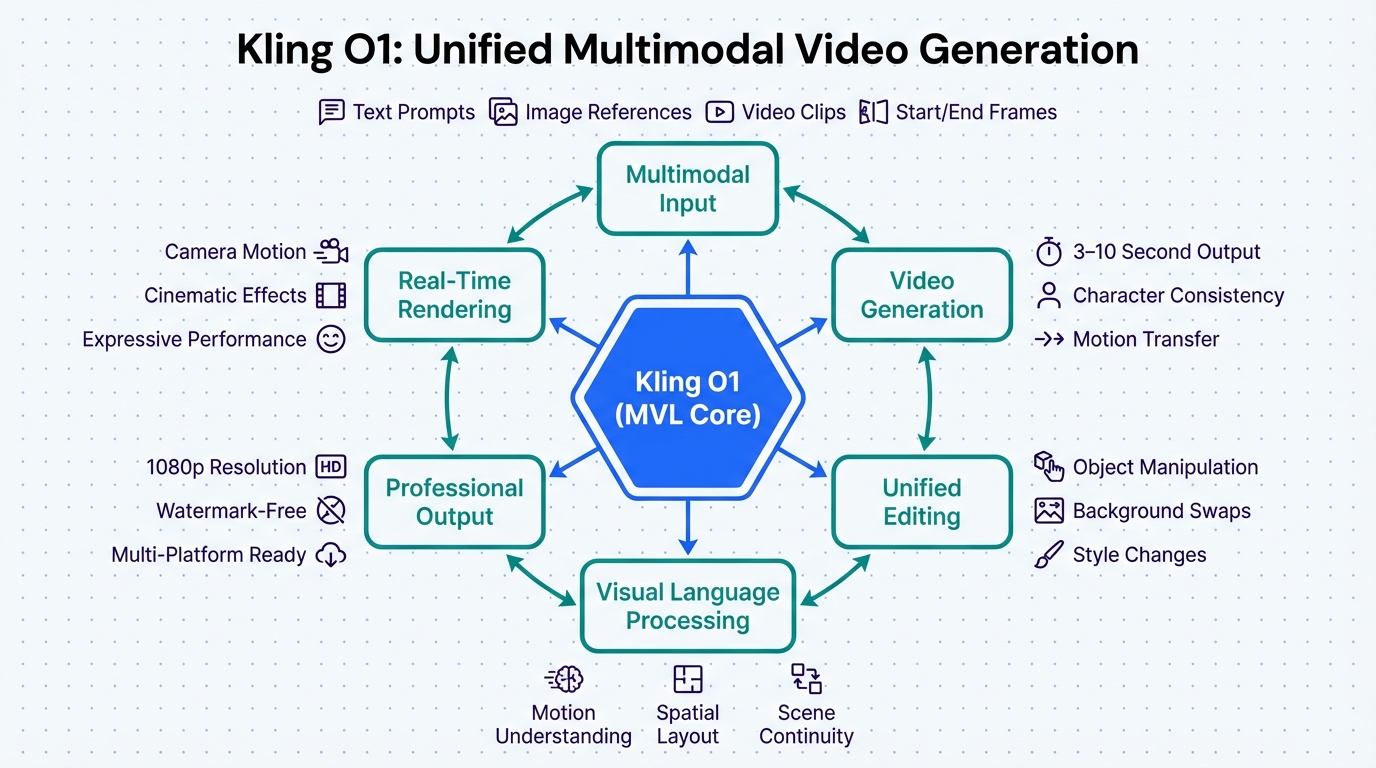
John: Okay, kiddo, picture this: Kling O1 is like a magical chef who not only cooks your meal but also shops for ingredients, plates it beautifully, and even tweaks the recipe on the fly. Technically, it’s a unified multimodal model—fancy words for a system that handles text, images, and videos all in one go, without switching apps. It uses advanced AI (built on something like massive neural networks, think of them as super-smart brains trained on tons of data) to generate, edit, and understand content seamlessly.
Lila: Simpler analogy: It’s like having a super-smart robot friend who listens to your story idea (“Make a video of a cat flying to space”), grabs pictures or clips you provide, and whips up a consistent video. No more choppy scenes—Kling O1 keeps characters and settings looking the same throughout, thanks to its clever understanding of images and motion. You type a prompt, add references if you want, and boom— a video appears in minutes.
John: From an engineering angle, it’s powered by a full-stack architecture that integrates generation and editing. No need for separate tools; it’s all in one framework, reducing errors and boosting speed. If you’re into the tech side, it’s like fine-tuning models such as Llama-3-8B but scaled for video—efficient and powerful.
Key Benefits That Shine
Lila: What makes Kling O1 stand out? Let’s highlight the big wins:
– Speed: Generates videos in seconds, not hours.
– Consistency: Keeps scenes and characters uniform, solving a huge pain point.
– Convenience: All-in-one for text-to-video, image control, and editing—no app hopping.
– Price: Affordable plans, with free tiers for starters, making it accessible.
John: Yeah, and it’s got features like start/end frame control and precise compositing, which means you can dictate exactly how your video begins and ends, like directing a mini-movie.
Real-World Examples: How You Can Use It Today
Lila: Let’s get practical. Here are three ways a regular person like you could use Kling O1:
1. **Social Media Magic:** You’re a student wanting to share a fun story about your day. Type “A day in the life of a busy teen exploring the city” into Kling O1, add a photo of yourself, and it creates a short, engaging video with smooth transitions. Pair it with tools like Revid.ai for turning blogs into shorts if you need more tweaks.
2. **Educational Content:** Teachers or learners can generate explainer videos. Say, “Explain photosynthesis with animations.” Kling O1 produces a clear, consistent clip—perfect for classes. If you’re learning coding alongside, check out Nolang for AI tutoring on topics like that.
3. **Small Business Boost:** Own a coffee shop? Create promo videos like “Cozy cafe vibes with steaming lattes.” It handles multi-shot generation seamlessly, making your ad look pro without hiring anyone. Quick, easy, and eye-catching.
John: These examples show how it democratizes video creation— no prior skills needed.
Old Way vs. New Way: A Simple Comparison
Lila: To see the difference, here’s a quick table:
| Aspect | Old Way (Traditional Tools) | New Way (Kling O1) |
|---|---|---|
| Time to Create a Video | Hours or days | Minutes |
| Consistency in Scenes | Often mismatched, requires manual fixes | Automatic and seamless |
| Ease for Beginners | Steep learning curve | Simple prompts, no expertise needed |
| Cost | Expensive software/subscriptions | Affordable, with free options |
John: See? The new way wins hands down.
Wrapping It Up: Time to Try It
Lila: In summary, Kling O1 is the best because it combines speed, ease, and power into one tool, making video creation fun and accessible. Whether you’re a student, hobbyist, or pro, it levels the playing field.
John: Don’t just take our word—head to the Kling AI site or Artlist and give it a spin. For automating more of your workflow, tools like Make.com can connect it to other apps seamlessly. Dive in and create!

👨💻 Author: SnowJon (Web3 & AI Practitioner / Investor)
A researcher who leverages knowledge gained from the University of Tokyo Blockchain Innovation Program to share practical insights on Web3 and AI technologies. While working as a salaried professional, he operates 8 blog media outlets, 9 YouTube channels, and over 10 social media accounts, while actively investing in cryptocurrency and AI projects.
His motto is to translate complex technologies into forms that anyone can use, fusing academic knowledge with practical experience.
*This article utilizes AI for drafting and structuring, but all technical verification and final editing are performed by the human author.
🛑 Disclaimer
This article contains affiliate links. Tools mentioned are based on current information. Use at your own discretion.
▼ Recommended AI Tools for Beginners
- 🔍 Genspark: An AI agent that saves you research time by summarizing search results.
- 📊 Gamma: Create beautiful presentations and docs in seconds just by typing.
- 🎥 Revid.ai: Turn your text or blogs into viral short videos instantly.
- 👨💻 Nolang: Learn coding or any topic by chatting with an AI tutor.
- ⚙️ Make.com: Automate boring tasks by connecting your favorite apps.
References & Further Reading
- New Kling O1 Omni Coming Soon: The Veo 3.1 Competitor You Didn’t See Coming – Artlist Blog
- Kling O1 Launches as the World’s First Unified Multimodal Video Model
- What is Kling O1? Why is better than other AI video models?