
Seedream 4.5: The Next Step Toward More Consistent, Cinematic AI Visuals
John: Hey everyone, welcome back to AI Mind Update. I’m John, your battle-hardened tech lead who’s seen enough AI hype to fill a server farm. Today, we’re diving into something that’s actually exciting—Seedream 4.5, the upcoming update from ByteDance that’s promising to make AI-generated visuals more consistent and cinematic. But don’t worry, we’re not here to drown you in buzzwords. My co-host Lila is joining me to bridge the gap for beginners.
Lila: That’s right, John. Think about this: Have you ever tried to create a cool image or video for a social media post, but it just didn’t look right? Maybe the colors were off, or the scene felt disjointed? That’s where Seedream 4.5 comes in. It’s like upgrading from a shaky home video to a Hollywood blockbuster. This matters to everyday folks because it democratizes creativity—now, students, hobbyists, and non-techies can whip up professional-looking visuals without needing fancy software or skills. And if you’re researching tools like this, a quick tip: Tools like Genspark can summarize the latest updates, saving you tons of search time.
John: Spot on, Lila. Let’s cut through the fluff. Seedream 4.5 is building on its predecessors with major boosts in realism, spatial logic (that’s how objects make sense in space), consistency across images, and better understanding of your prompts. Imagine telling an AI, “Make a futuristic city at sunset,” and it actually gets it right—every time. No more weird artifacts or mismatched elements. This is huge for fields like advertising, architecture, fashion, and gaming, but it’s accessible for anyone.
Lila: Before this tech, creating visuals was a hassle. You’d sketch ideas by hand, use clunky software like old photo editors, or hire professionals—which costs time and money. Remember fiddling with layers in Photoshop just to get a simple design? It was frustrating, especially for beginners. Tools have improved, but consistency was always hit-or-miss. Now, with AI like Seedream, it’s like having a magic wand. And if you’re presenting these ideas, something like Gamma can help turn them into quick slides or docs.
How It Works: Like Explaining to a 12-Year-Old
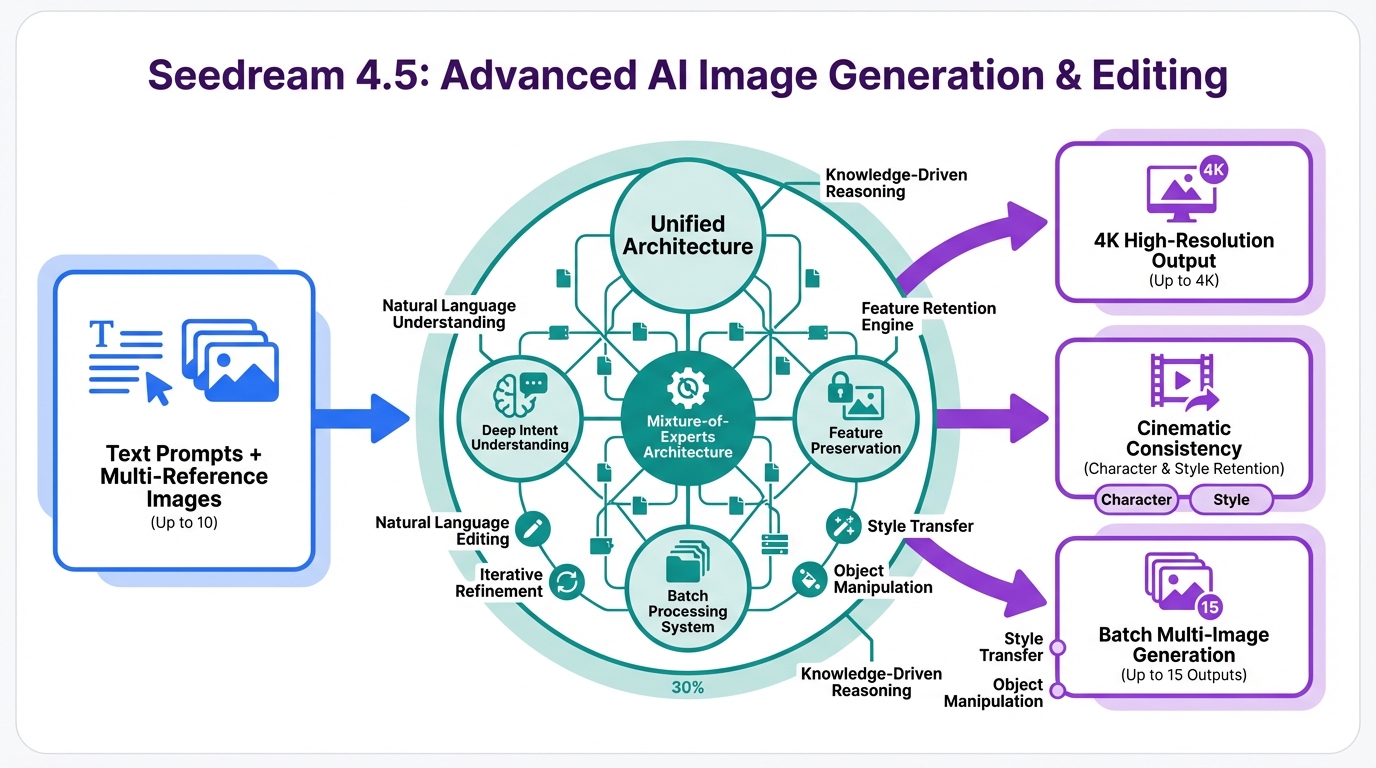
John: Alright, let’s break this down without the engineering jargon overload. Seedream 4.5 is essentially an AI model—think of it as a super-smart artist inside your computer. It takes your words (the prompt) and turns them into images or visuals. But what’s new? It’s like upgrading from a basic watercolor set to a full digital studio with unlimited paints.
Lila: Imagine you’re telling a story to a friend. In older AI tools, the friend might mishear and draw a cat instead of a hat. Seedream 4.5 is like that friend who’s now wearing super-hearing aids—it understands your prompt better, keeps the story consistent (same characters, same style throughout), and adds cinematic flair, like dramatic lighting or smooth transitions. It’s built on a unified architecture, meaning generation and editing happen in one seamless flow. No more starting over; just tweak and go. It’s as if you have a movie director in your pocket, directing scenes based on your script.
John: From an engineering perspective, it’s fine-tuned on massive datasets—think billions of images—to improve spatial logic. That’s like teaching the AI the rules of physics in a virtual world, so objects don’t float weirdly. And for speed? It’s optimized for quick outputs, even in 4K resolution. If you’re into the tech side, it’s similar to models like Stable Diffusion but with ByteDance’s twists for better prompt adherence.
Real-World Examples: How You Can Use It
Lila: Let’s make this practical. First, say you’re a student working on a school project. You can generate consistent visuals for a history presentation—like a series of ancient Rome scenes that all look like they’re from the same era. No more mismatched stock photos!
John: Second, for social media enthusiasts: Create cinematic thumbnails or stories. Prompt something like “A cozy coffee shop in autumn,” and get variations that stay true to the theme. If you’re turning this into videos, tools like Revid.ai can help convert your AI images into short clips.
Lila: Third, hobbyists or small business owners: Design product mockups. Imagine fashion sketches where the model’s pose and outfit remain consistent across edits. It’s perfect for brainstorming without costly photoshoots. And if you’re learning to code or scripting these prompts, chat with an AI tutor via Nolang to get started.
Highlight: These examples show how Seedream 4.5 turns ideas into reality fast, saving hours of manual work.
Old Way vs. New Way: A Simple Comparison
John: To see the difference, check this out.
| Aspect | Old Way (Traditional Tools) | New Way (Seedream 4.5) |
|---|---|---|
| Consistency | Often inconsistent; manual tweaks needed for series | High consistency across generations and edits |
| Speed | Slow, especially for high-res | Lightning-fast, even in 4K |
| Ease of Use | Requires skills in software like Photoshop | Simple prompts; beginner-friendly |
| Cinematic Quality | Basic; lacks depth | Hollywood-like realism and logic |
Lila: See? The new way is a game-changer.
Wrapping It Up: Time to Get Creative
John: In summary, Seedream 4.5 is pushing AI visuals toward more reliable, movie-like results. It’s not perfect—AI still has quirks—but it’s a big leap for accessibility.
Lila: If you’re excited, keep an eye on its release. Start experimenting with similar tools today. For automating your creative workflows, check out Make.com to connect apps effortlessly. What visuals will you create first?

👨💻 Author: SnowJon (Web3 & AI Practitioner / Investor)
A researcher who leverages knowledge gained from the University of Tokyo Blockchain Innovation Program to share practical insights on Web3 and AI technologies. While working as a salaried professional, he operates 8 blog media outlets, 9 YouTube channels, and over 10 social media accounts, while actively investing in cryptocurrency and AI projects.
His motto is to translate complex technologies into forms that anyone can use, fusing academic knowledge with practical experience.
*This article utilizes AI for drafting and structuring, but all technical verification and final editing are performed by the human author.
🛑 Disclaimer
This article contains affiliate links. Tools mentioned are based on current information. Use at your own discretion.
▼ Recommended AI Tools for Beginners
- 🔍 Genspark
An AI agent that saves you research time by summarizing search results. - 📊 Gamma
Create beautiful presentations and docs in seconds just by typing. - 🎥 Revid.ai
Turn your text or blogs into viral short videos instantly. - 👨💻 Nolang
Learn coding or any topic by chatting with an AI tutor. - ⚙️ Make.com
Automate boring tasks by connecting your favorite apps.
References & Further Reading
- Seedream 4.5 Coming Soon: Smarter, More Cinematic AI Generation
- Seedream 4.5: Major Improvements to Realism and Consistency