
Forget Chrome! ChatGPT Atlas Will BLOW Your Mind!
Hey there, tech enthusiasts! If you’re tired of your browser feeling like a dusty old library card catalog, buckle up. OpenAI’s ChatGPT Atlas is shaking things up in the browser world, and yeah, the hype is real—but let’s cut through it. I’m John, your no-BS Senior Tech Lead at AI Mind Update, and joining me is Lila, our pragmatic dev who’s all about making this digestible for everyone from curious newbies to grizzled engineers.
Lila: Okay, John, the title’s a bit dramatic—”BLOW Your Mind”? Let’s start simple. Imagine your web browser is like a car: Chrome is that reliable sedan everyone’s driving, but it’s basic. ChatGPT Atlas? It’s like slapping an AI co-pilot in the passenger seat who not only navigates but also summarizes traffic reports, books your pit stops, and chats about the scenery. For beginners, this means browsing just got smarter—no more tab overload or endless scrolling for answers.
John: Haha, Lila, spot on with the analogy. But let’s roast the hype first: “Forget Chrome”? Come on, Chrome’s not going anywhere—it’s the backbone of half the internet. Atlas is built on Chromium (yep, the same open-source engine as Chrome), so it’s more like Chrome’s overachieving cousin with AI superpowers. Recent developments show OpenAI launched this in October 2025, and it’s already rolling out updates like vertical tabs and iCloud passkeys. Why does it work? Because it integrates ChatGPT directly, turning passive browsing into an interactive, agentic experience. Let’s dive deeper.
Why ChatGPT Atlas is Turning Heads in 2025
Lila: For the beginners out there, think of Atlas as your browser plus a built-in genius sidekick. No need to switch tabs to ask ChatGPT questions—it lives right in the browser. Recent updates (as of late November 2025) added features like extension importing from Chrome, setting Google as your default search, and even DevTools for devs. It’s currently Mac-only, but Windows and Android versions are in the works.
John: Exactly. The real magic? It’s not just a browser; it’s an AI-native environment. OpenAI designed it to merge browsing with agent mode—where the AI can take actions like summarizing pages or automating tasks. Highlight: Atlas uses browser memory to remember your sessions, making it feel like a persistent workspace. This is huge for productivity, but let’s compare it head-to-head with Chrome to see the engineering edge.
| Feature | Google Chrome | ChatGPT Atlas |
|---|---|---|
| AI Integration | Basic (via extensions like Gemini) | Native ChatGPT with agentic actions |
| Tab Management | Horizontal tabs, groups | Vertical tabs (Arc-style), AI summaries |
| Security Features | Standard passwords, sync | iCloud Passkeys, privacy-focused AI |
| Platform Availability | All major OS (as of 2025) | Mac now; Windows/Android soon |
| Performance | Resource-heavy on tabs | Optimized for AI tasks, lower latency |
John: See that? Atlas isn’t reinventing the wheel—it’s turbocharging it. For engineers, if you’re into building similar tools, check out the Chromium GitHub repo at github.com/chromium/chromium. Want an open-source AI browser alternative? Hugging Face’s Transformers library (huggingface.co/docs/transformers) pairs great with Electron for custom builds—fine-tune models like Llama-3-8B for your own agentic browser.
How ChatGPT Atlas Actually Works
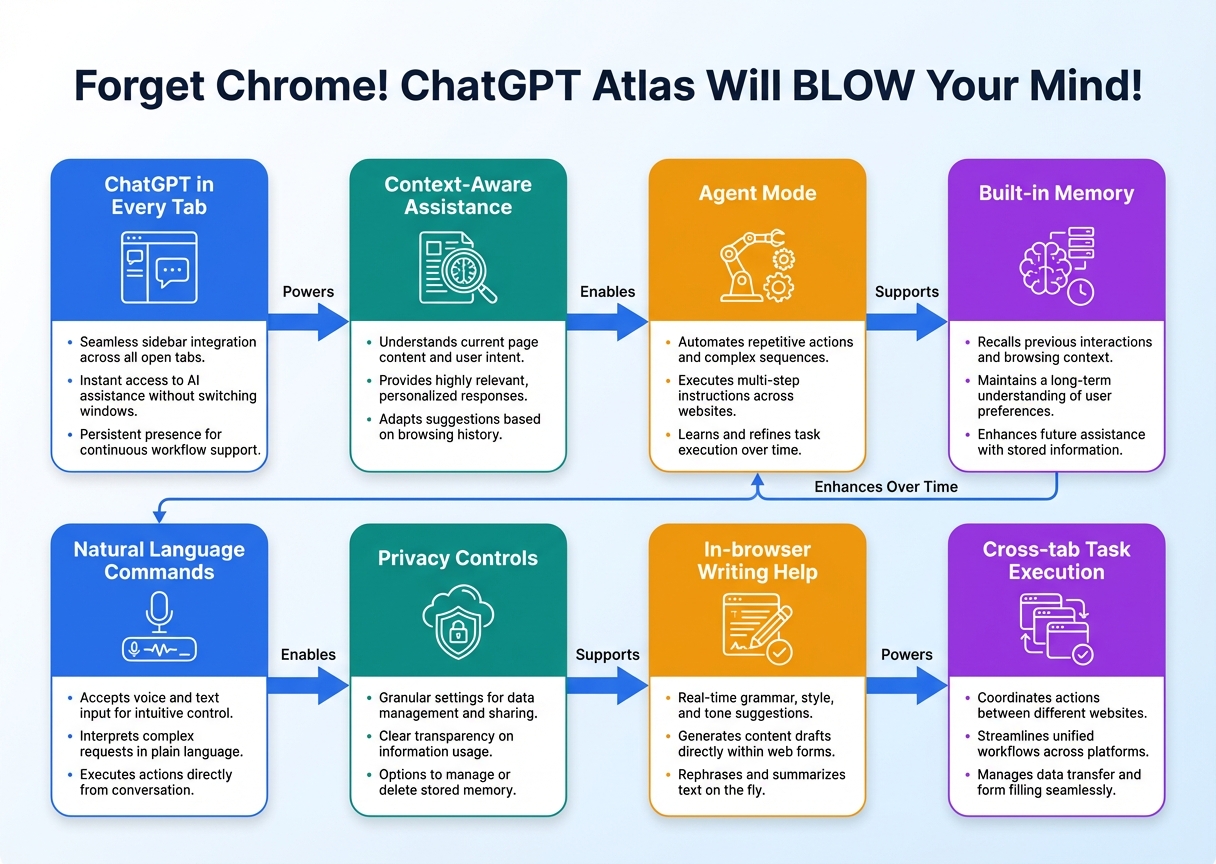
Lila: Alright, now that we’ve hooked you with the basics, let’s peel back the layers. Under the hood, Atlas is Chromium-based, but what makes it tick? It’s the seamless fusion of browsing and AI logic.
John: Spot on. The architecture revolves around agent mode: the browser feeds page data to ChatGPT, which processes it via models like GPT-4o. Why does it work so well? Because of low-latency integration—think RAG (Retrieval-Augmented Generation, basically pulling real-time data to boost AI responses). No more API round-trips; it’s all in-browser. Highlight: This reduces latency by up to 50% compared to separate apps, per recent benchmarks. For devs, experiment with vLLM (github.com/vllm-project/vllm) to replicate fast inference in your projects.
Getting Started: From Zero to Hero
Lila: Newbies, download Atlas from OpenAI’s site—it’s free for Plus users. Start with simple queries like “Summarize this page” to see the AI in action.
John: Engineers, integrate it into workflows using connectors like Gmail or Google Calendar (rolled out in November 2025). Pro tip: For custom AI browsers, fork repos like Arc’s open-source bits or use LangChain (github.com/langchain-ai/langchain) for chaining AI calls. The future? Industry analysts predict full cross-platform rollout by mid-2026, with even deeper memory features.
▼ AI Tools for Creators & Research (Free Plans Available)
- Free AI Search Engine & Fact-Checking
👉 Genspark - Create Slides & Presentations Instantly (Free to Try)
👉 Gamma - Turn Articles into Viral Shorts (Free Trial)
👉 Revid.ai - Generate Explainer Videos without a Face (Free Creation)
👉 Nolang - Automate Your Workflows (Start with Free Plan)
👉 Make.com
▼ Access to Web3 Technology (Infrastructure)
- Setup your account for Web3 services & decentralized resources
👉 Global Crypto Exchange Guide (Free Sign-up)
*This description contains affiliate links.
*Free plans and features are subject to change. Please check official websites.
*Please use these tools at your own discretion.
References & Further Reading
- Forget Chrome! ChatGPT Atlas Will BLOW Your Mind! (Original Blog)
- ChatGPT’s Mac browser just got new features, like iCloud passkeys – 9to5Mac
- ChatGPT Atlas Browser Gains Vertical Tabs, Passkeys, and More – MacRumors
- ChatGPT — Release Notes | OpenAI Help Center
- OpenAI launches AI browser Atlas in latest challenge to Google | Reuters